
How to write a 30-60-90 day plan (and keep it alive past week one)
What a 30-60-90 day plan is, what belongs in each phase (learn, contribute, own), a one-page structure you can copy, and how to keep it in use.
- A 30-60-90 day plan has three modes: learn (days 1 to 30), contribute (31 to 60) and own (61 to 90).
- Each phase needs a one-sentence goal, 3 to 5 concrete steps, named owners and a scheduled check-in with your manager.
- The most common mistake is promising delivery during the learning phase.
- Plans written in a document describe the job as imagined before day one; keep yours where you and your manager can change it.
- In SketchMind, draft the plan as Frames on a board, then use the Plans tool (/plans) to draft steps and move them to Agenda and Focus.
Somewhere between accepting the offer and your first Monday, someone will suggest you write a 30-60-90 day plan. It is good advice. It is also where most people open a blank document and paste in a template written for somebody else's job. This guide covers what a 30-60-90 day plan is for, what belongs in each phase, and how to build one that is still in use when day 60 arrives.
Short answer: A 30-60-90 day plan is a one-page plan for your first three months in a new role, split into three phases: learn (days 1 to 30), contribute (days 31 to 60) and own (days 61 to 90). Each phase gets a one-sentence goal, 3 to 5 concrete steps, named owners for steps that depend on others, and a scheduled check-in with your manager.
What is a 30-60-90 day plan?
A 30-60-90 day plan is a short, phased plan for your first 90 days in a new job. It answers three questions in order: what will I learn first, where will I start contributing, and what will I own by the end of the quarter? Managers ask for one because it shows how you think. New hires benefit because the first months of any job are full of names, tools and half-explained context, and a plan gives that period an order.
The plan is not a promise to do everything. It is a promise to do the right things in the right order, which means the hardest part is deciding what to leave out of the first 30 days.
What goes in each phase of a 30-60-90 day plan?
Each phase has a different mode: learn, contribute, own. Treat the numbers as three modes rather than three hard deadlines.
The three phases of a 30-60-90 day plan
|Phase|Mode|What belongs here|
|---|---|---|
|Days 1–30|Learn|Meet the people, learn the product, understand how decisions get made. Output: a clear picture, not deliverables.|
|Days 31–60|Contribute|Take on real work inside existing processes. Output: first shipped contributions and early feedback.|
|Days 61–90|Own|Run something end to end. Output: one visible result you are accountable for.|
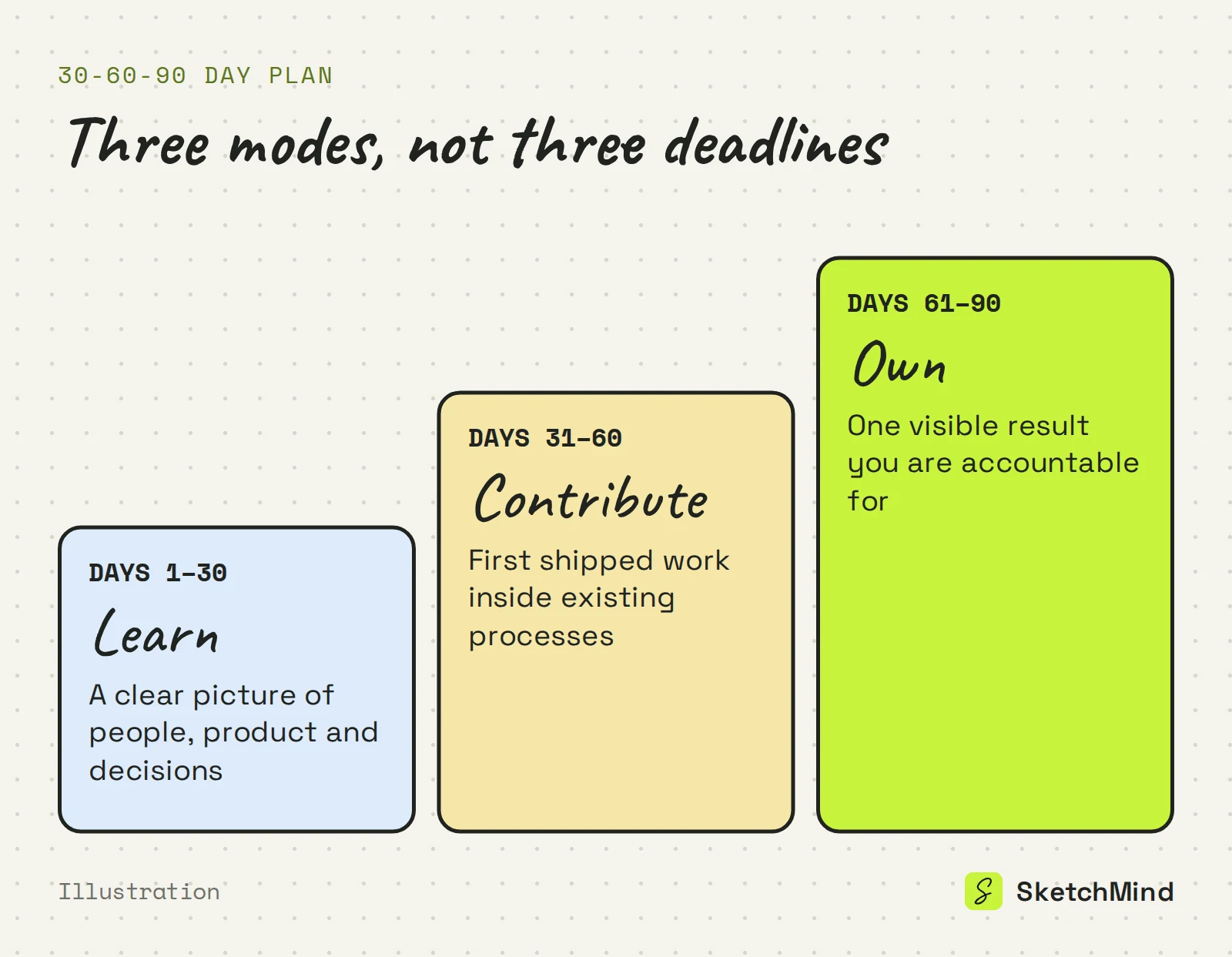
The most common mistake is promising delivery in the learning phase. The second is the opposite: a 30-day phase so vague ("get up to speed") that nobody, including you, can tell whether it happened.
How do you write a 30-60-90 day plan?
Write the same four things for each of the three phases, and keep the whole plan to one page.
- A goal. One sentence describing what is true at the end of the phase. "I can walk through our sales process without help" beats "understand sales".
- Three to five steps. Concrete actions that get you to the goal, each small enough that you would notice if you skipped it.
- Owners. Mostly you, but some steps depend on others: a manager who makes introductions, a teammate who walks you through the codebase. Naming them turns a private list into a shared agreement.
- A check-in. A date on the calendar, at each phase boundary (around day 30, 60 and 90), when you and your manager review the phase together.
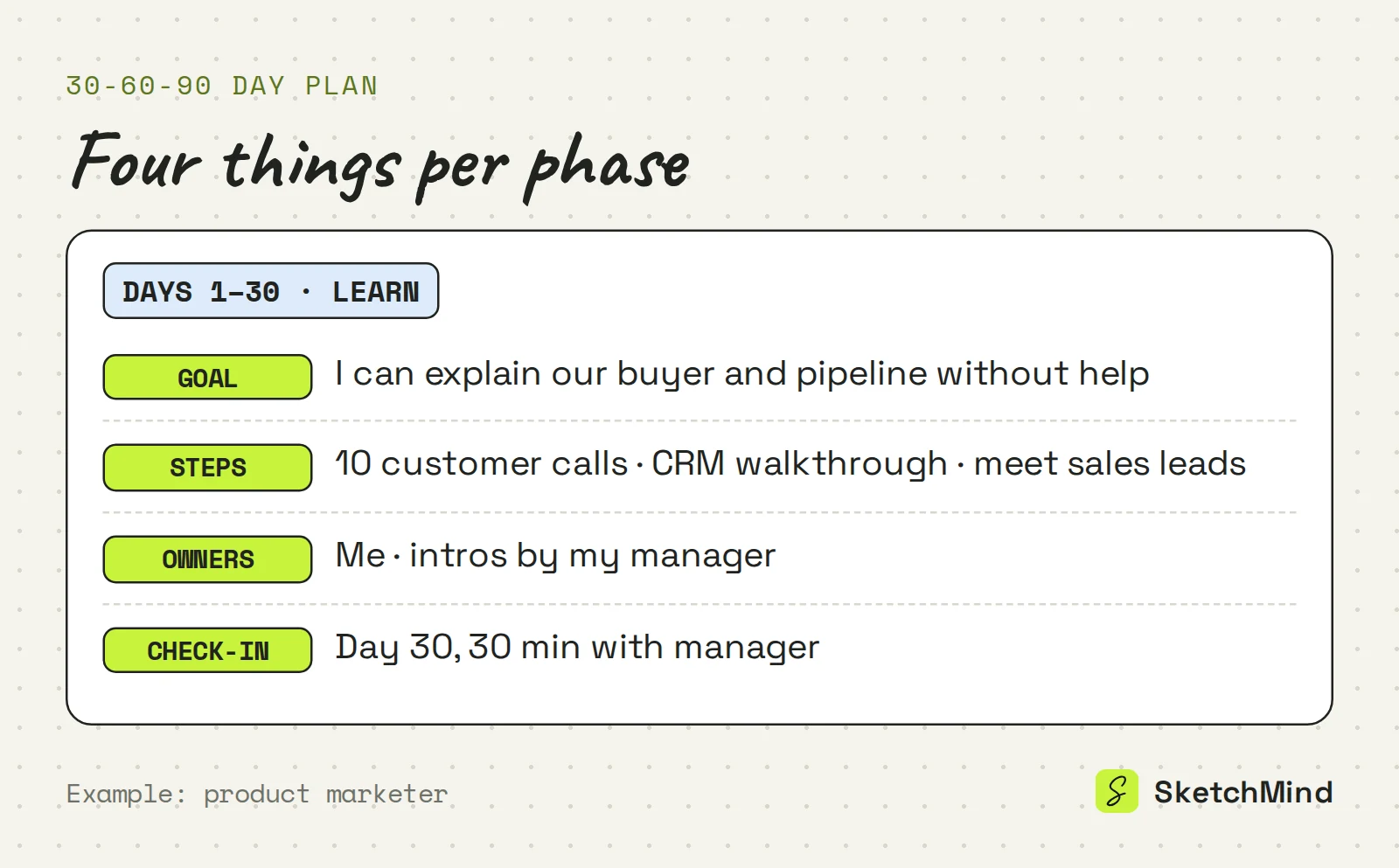
If it does not fit on one page, the phases carry too much. For how a single goal breaks down into owned steps, see the action plan example.
Why do most 30-60-90 day plans stop being used?
Most 30-60-90 day plans stop being used because they live in a document that describes the job as imagined before day one. By week three, reality has edited the job: a project got cancelled, a priority appeared, the quick onboarding turned out to be six systems deep. The document does not know any of this, and updating a file nobody else looks at is the kind of task that never happens.
A plan you can see, point at and change in the meeting where the change is decided lasts much longer. Put it where your manager can see it, and bring it to every check-in.
How to build a 30-60-90 day plan in SketchMind
In SketchMind, an AI whiteboard, you draft the plan on a board and then track it with the workspace tools. Plan is no longer a board type in Create with AI; plans have their own tool at /plans.
- Draft the board. Open Create with AI, choose Frames and describe your situation, for example: "First 90 days as the first product marketer at a 20-person B2B startup; a goal per phase, steps with owners, check-ins with my manager at each phase boundary." Attach the job description as a PDF (up to 5 MB) so the result follows what the role actually says. You get 4 to 8 editable frames in about 40 seconds.
- Edit it. Every element is editable. Use Rewrite on a frame with an instruction such as "make the day-30 goal measurable".
- Present it in week one. Press P or use Present to walk your manager through it from the board, and add reveal steps if you want to show one phase at a time. Share the board by link; viewers are unlimited on every plan.
- Turn it into steps. In Plans, choose "+ New plan" and start from that board; SketchMind drafts the steps. Move steps to Agenda, where the quarter view covers all 90 days, and start a Focus session of 15, 25 or 45 minutes on the next one. Write the three phase outcomes in Goals.
A plan generator does not know your job. The thinking about what to learn first and what to own by day 90 is still yours. Agenda, Goals and the Focus timer are included on every plan, and the Free plan includes 5 AI boards as a one-time allowance, with no credit card needed to start.
Last updated: September 28, 2026. Checked against the current SketchMind app.
How detailed should a 30-60-90 day plan be?
One page. Each phase gets a one-sentence goal and 3 to 5 steps; if it runs longer, move the detail into conversations with your manager.
Should I write my 30-60-90 day plan before or after starting?
Draft it before day one, since it often comes up in interviews or the first week. Then treat the first two weeks as an editing pass, once you have seen the real job.
What should the first 30 days focus on?
Learning: meeting the people, learning the product and understanding how decisions get made. The output of the first phase is a clear picture, not deliverables.
Can SketchMind generate a 30-60-90 day plan?
Yes. Describe your role in Create with AI and choose Frames, optionally attaching the job description as a PDF; you get 4 to 8 editable frames in about 40 seconds. The Plans tool at /plans can then draft steps from that board.
Is plan still a board type in SketchMind?
No. Plans moved to its own tool at /plans, which starts from a board and drafts the steps. Agenda, Goals and the Focus timer are included on every plan.