
How to create a study plan (you'll still be following in week five)
How to create a study plan you'll still follow in week five: count back from the exam, make every step finishable in one session, and keep a weekly buffer.
- A study plan is a dated schedule of concrete study steps that leads to a specific exam or deadline.
- Study plans usually fail for three reasons: vague blocks, dates not tied to the exam, and no way to recover from a missed day.
- Plan backwards from the exam: count your sessions, reserve the last one or two weeks for past papers and review, and split the rest into steps you can finish in one session.
- Leave one buffer session a week; if you fall more than a week behind, re-plan from the exam date and cut topics.
- In SketchMind, Create with AI turns a syllabus PDF into a board, Plans drafts steps from it, and the Focus timer runs 15, 25 or 45 minutes.
Every study plan starts with a burst of optimism, a color-coded grid, and the word "Biology" written across four evenings. By week two the grid and reality have gone separate ways, usually because the plan was vague where it needed to be specific and rigid where it needed to move.
Short answer: To create a study plan, start from the exam date and the syllabus, count the study sessions you actually have, and split the material into steps you can finish in one session. Schedule backwards from the exam, keep the last one or two weeks for past papers and review, and leave one buffer session a week so a missed evening doesn't break the plan.
What is a study plan?
A study plan is a dated schedule of concrete study steps that leads to a specific exam or deadline. Each step says what you will do, when, and roughly how long it takes. "Biology on Tuesday" is a block in a calendar. "Tuesday: practice problems, set 2" is a step in a study plan.
Why do most study plans fail by week two?
Most study plans fail for three reasons, and none of them is a lack of discipline.
- Vague blocks. "Study chapter 5" has no finish line. You can't complete it, so you can't feel progress.
- Dates that aren't tied to the exam. A plan that doesn't count back from the exam date is a list of good intentions.
- No way to recover. The first missed evening breaks the grid, fixing the grid is work, and so the grid loses.
A plan that survives has the opposite properties: steps you can finish in a sitting, dates that count back from the exam, and room to shift when life happens.
How do you create a study plan, step by step?
Build the plan from the exam backwards, in this order.
- Collect the facts. The exam date, the syllabus or topic list, and past papers if you can get them.
- Count your sessions. Six weeks with four sessions a week is 24 sessions. That number, not your optimism, decides how much fits.
- Reserve the end. Keep the last one or two weeks for past papers and reviewing weak spots.
- Split the rest into steps. Divide the topics over the remaining sessions, one finishable step per session.
- Add a buffer. Leave one session a week empty. It absorbs a missed evening without moving anything else.
- Check in weekly. Ten minutes on Sunday: what got done, what moved, what's next.
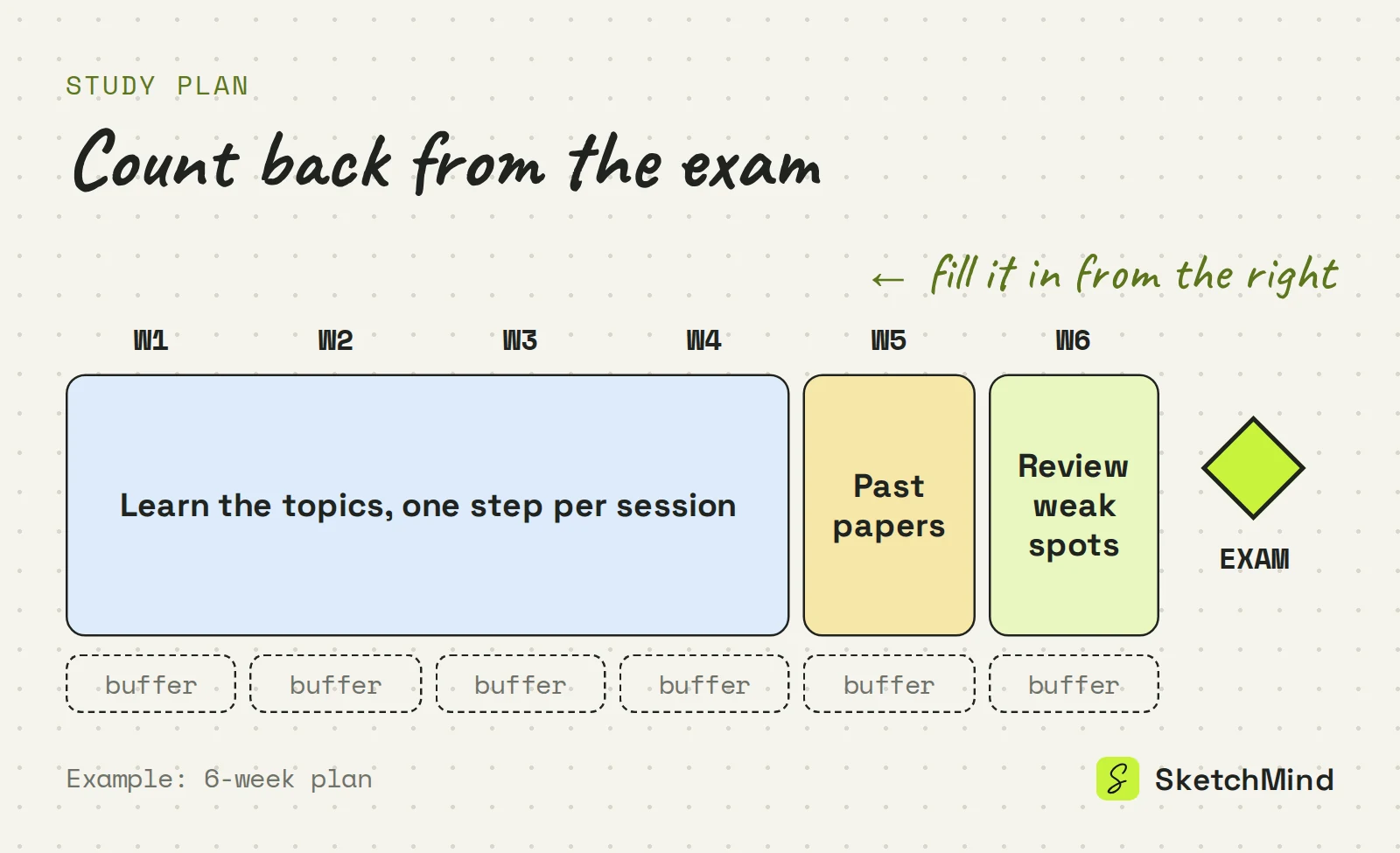
This is the same backwards logic as a project plan. How to create a project timeline covers it for work projects.
What makes a study step concrete?
A concrete step has a visible end: something done, checked or written. If you can't tell whether you finished it, rewrite it.
Vague block vs. concrete study step
|Vague block|Concrete step|
|---|---|
|Biology, Tue and Thu|Tue: practice problems, set 2, checked against answers|
|Read chapter 5|Summarize 5.1 to 5.3 on one page|
|Revise everything|Do one past-paper section and mark it|
|Learn vocabulary|50 flashcards, topic 3|
How long should a study session be?
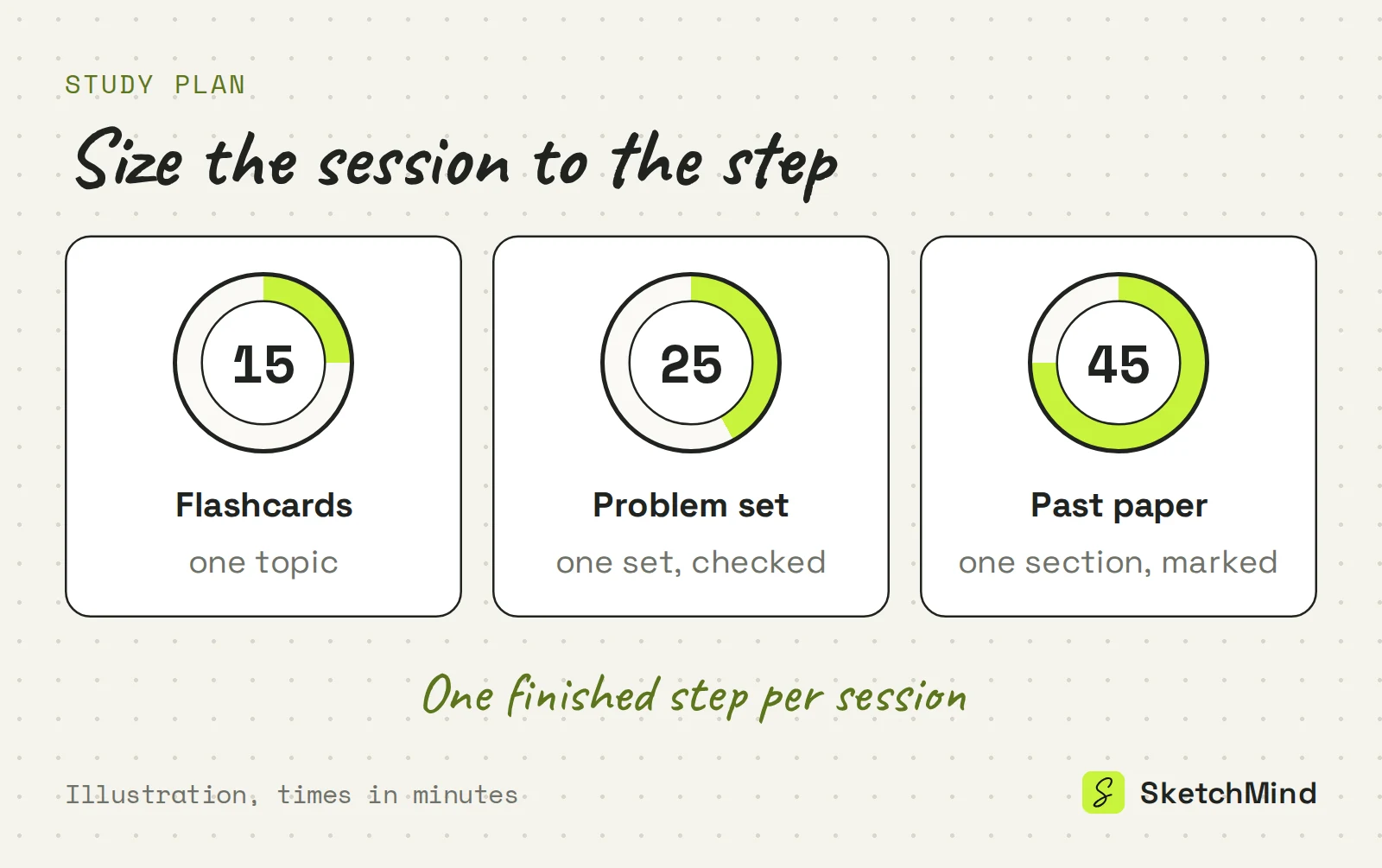
A study session should be long enough to finish one step, which for most steps is 15 to 45 minutes. Short sessions suit recall work like flashcards. Around 25 minutes fits a problem set. A past-paper section usually needs 45. Size the session to the step, and take a short break before the next one.
What should you do when you fall behind?
Use the buffer first. A missed session moves into that week's empty slot and nothing else changes. If you are more than a week behind, re-plan from the exam date: count the sessions you have left and cut the lowest-priority topics instead of squeezing everything into longer evenings. A smaller plan you follow beats a full one you've stopped opening.
How to create a study plan in SketchMind
SketchMind, an AI whiteboard, can turn your syllabus into a board and the board into a plan. Open Create with AI, attach the syllabus as a PDF (up to 5 MB) and describe the exam: subject, date, weeks left. Checklist gives one editable checklist frame in about 15 seconds; Frames gives 4–8 editable frames in about 40 seconds, for example one per topic. The output is written in the language of your prompt.
Then open Plans and choose + New plan. Plans starts from a board and drafts the steps for you, and you can move steps to your Agenda or straight into a Focus session. The Agenda has day, week, month, quarter and year views; the month view shows the week where two deadlines collide before you are in it. The Focus timer runs 15, 25 or 45 minutes, or a custom length, and starts from agenda tasks and plan steps. Put the exam itself in Goals; its progress comes from your agenda items. Plans, Agenda, Goals and Focus are on every plan, including Free, and the Free plan includes 5 AI boards as a one-time allowance, with no credit card to start.
Last updated: September 25, 2026. Checked against the current SketchMind app.
How do I create a study plan?
Start from the exam date and syllabus, count the study sessions you have, reserve the last one or two weeks for past papers and review, and split the rest into steps you can finish in one session. Leave one buffer session a week.
How long should a study session be?
Long enough to finish one concrete step, usually 15 to 45 minutes. Short sessions suit flashcards, around 25 minutes fits a problem set, and a past-paper section often needs 45.
How far ahead should I start a study plan?
Start as soon as you know the exam date and the material. Count the sessions you have between now and the exam; if the material doesn't fit, cut lower-priority topics early instead of cramming later.
What if I fall behind on my study plan?
Move the missed session into that week's buffer slot. If you are more than a week behind, re-plan from the exam date with the sessions you have left and drop the lowest-priority topics.
Can I make a study plan in SketchMind for free?
Yes. Plans, Agenda, Goals and the Focus timer are part of the workspace on every plan, including Free. The Free plan also includes 5 AI-generated boards as a one-time allowance, with no credit card to start.