
How to create a project timeline (and keep it honest after kickoff)
Start from the deadline, work backwards to 4–8 milestones, put one name on every step, and keep the timeline where the team looks.
- A project timeline shows what has to happen, in what order, by when, and who owns each step, legible at a glance.
- Plan backwards from the deadline, so conflicts surface on day one instead of week six.
- Use 4–8 verifiable milestones: results like "approved" or "shipped", not activities.
- Every step gets exactly one owner; "the team" is how deadlines fall through.
- Keep the timeline where people already look and make updating cheap, or it starts lying.
Most project timelines die one of two deaths. Either they never get made, because opening a Gantt tool feels like a project in itself, or they get made once, beautifully, and quietly stop matching reality around week two. Both problems have the same root: the timeline lives too far away from the actual work.
Short answer: To create a project timeline, start from the deadline and name what must exist on that date, work backwards to 4–8 milestones that an outsider could verify, and put exactly one owner on every step. Then keep the timeline where the team already looks, so updating it takes seconds and it stays true after kickoff.
What should a project timeline include?
A project timeline is a visual schedule that shows what has to happen, in what order, by when, and who owns each step. That is all it has to do. Dependencies, swimlanes and resource histograms are refinements: useful on a 200-task construction schedule, overkill for the projects most teams actually run.
A timeline earns its keep when someone can glance at it and know what's late. If reading it requires a tutorial, people stop reading it, and you're back to running the project from memory and chat threads. So the bar isn't "impressively detailed". The bar is "legible at a glance, current enough to trust".
Step 1: Why should you plan from the deadline backwards?
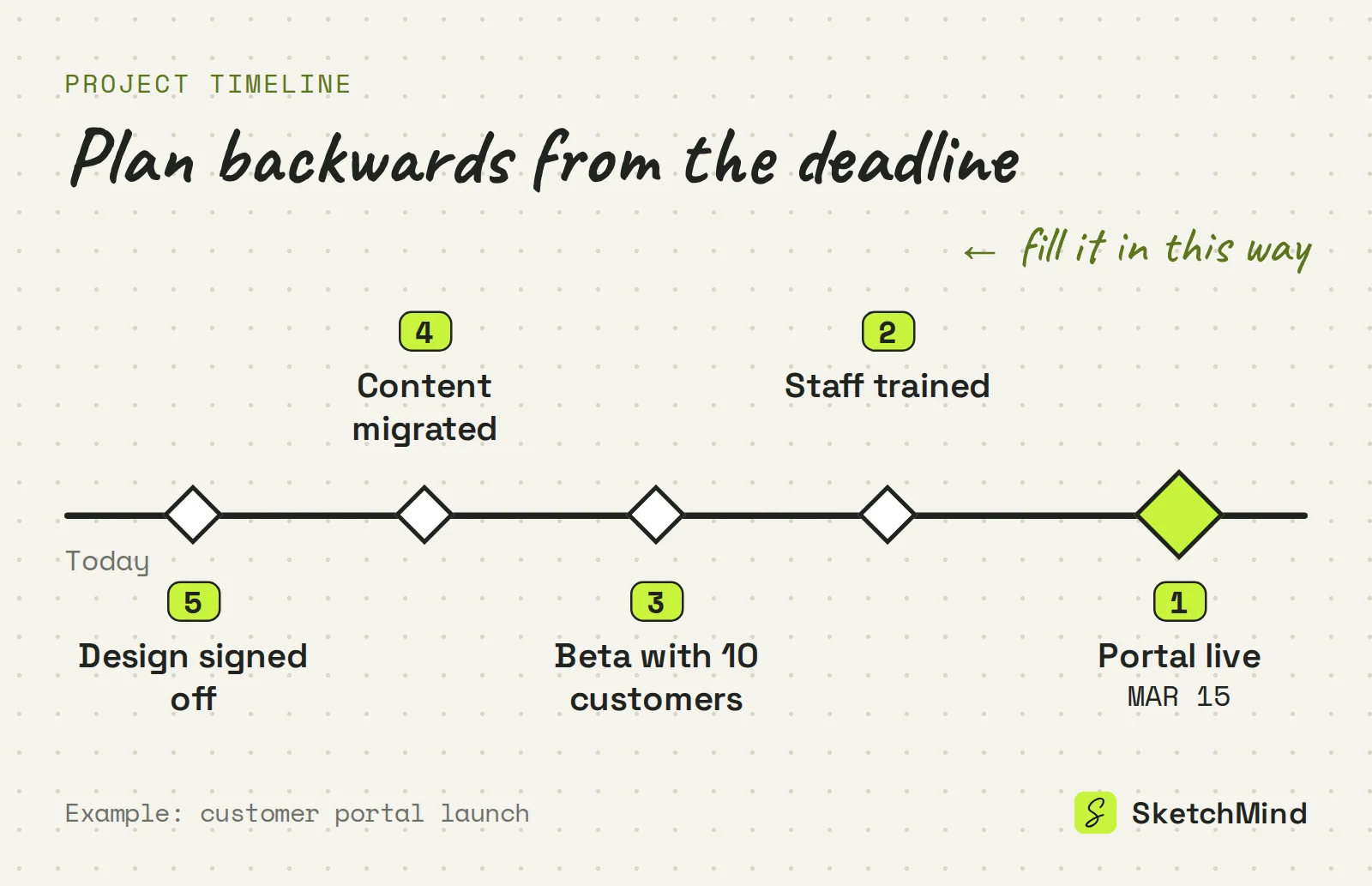
Planning backwards makes conflicts show up on day one instead of in week six. The instinct is to list tasks from today forward. Resist it and start from the other side: what is the deadline, and what must exist on that date? A launched product, a signed contract, a delivered workshop. Name the end state concretely.
Planning forward, every task politely takes the time it "should" take, and you discover late that the math never worked. Planning backwards from a fixed date, the conflicts surface while you can still do something about them: cut scope, move the date, or add hands.
Step 2: How many milestones should a timeline have?
Most projects need between four and eight milestones. Between today and the end state, place the moments where the project visibly changes state: design approved, first version working, content finished, dress rehearsal done. Milestones are results, not activities. "Working on the deck" is not a milestone; "deck approved by legal" is.
A good check per milestone: could someone outside the project verify it happened? "Approved", "shipped" and "signed" pass that test. "Progressing nicely" does not. More than eight and you've started listing tasks again.
Step 3: Who should own each step?
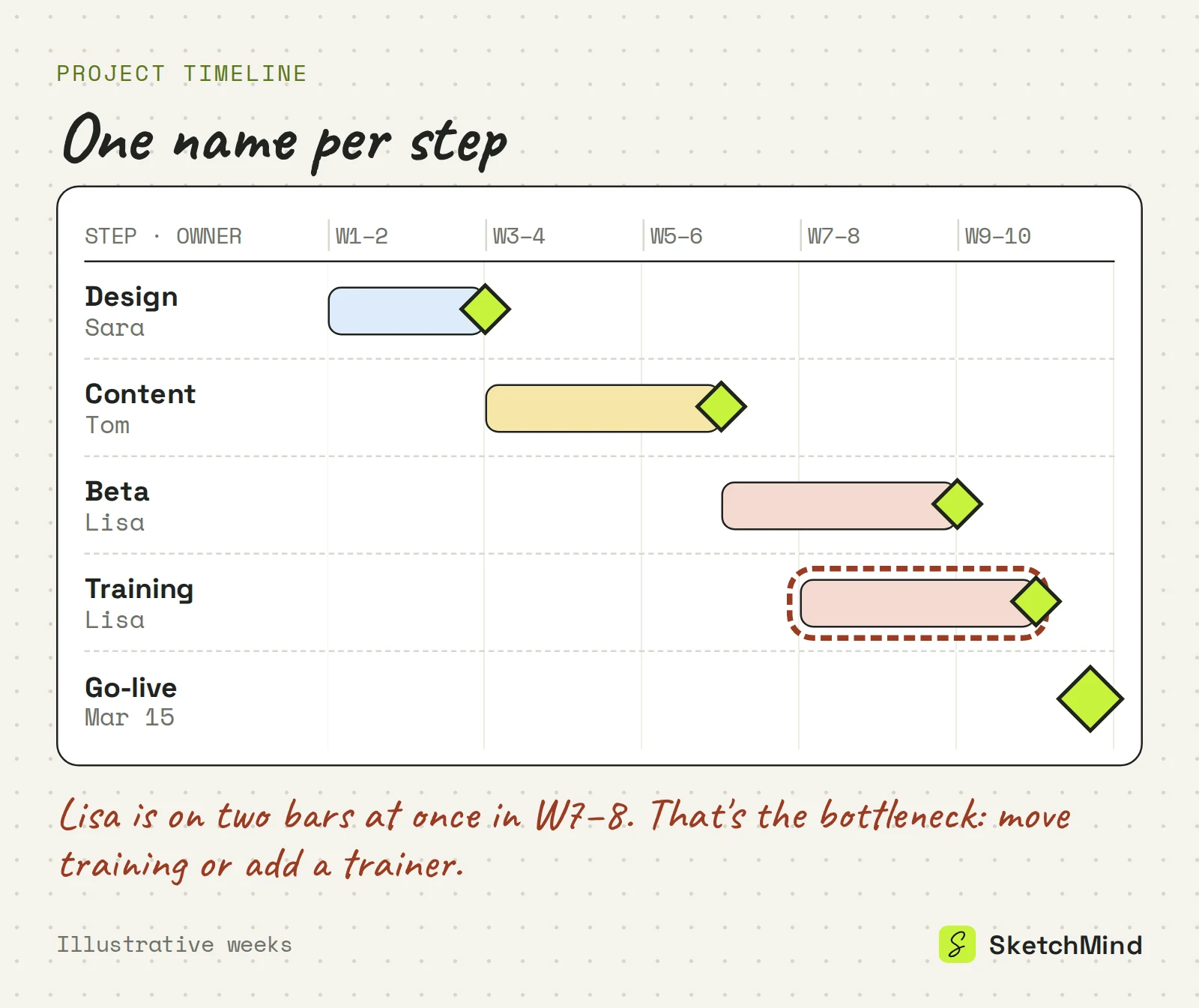
Exactly one person per step. An unowned step is a wish. For every milestone and every step between milestones, attach one name: not a department, not "the team", one person who will say "that's mine". Shared ownership sounds collaborative and works exactly until the first deadline, when it turns out everyone thought someone else had it.
This is also where your timeline becomes a management tool instead of a diagram. When a step slips, you don't ask the room, you ask the name. And when one name appears on five parallel steps, you've found your bottleneck before the project did. For the smaller tasks inside each step, a project checklist works better than more bars on the timeline.
Step 4: Where should a project timeline live?
Where the team already looks, and in a tool where moving a date takes seconds. The most common failure isn't a bad timeline, it's a good one nobody opens after the kickoff. A timeline in a file share is archaeology by week three. It has to be opened in the weekly, shared with stakeholders and updated the moment reality disagrees with the plan.
If moving a date means re-wrestling a chart, updates stop and the timeline starts lying. If it means dragging things around on a board everyone can see, updates keep happening. Choose the tool accordingly.
Where should the timeline live?
|Home|Best at|First version|Moving a date in the weekly|
|Gantt software|Big schedules with many dependencies|High effort: tasks, dates and links up front|Usually one owner updates it afterwards|
|Spreadsheet|Lists, dates and numbers|Medium: rows and columns|Possible, but formulas break easily|
|Shared board|Plans a team discusses together|Low: steps, owners, milestones|Drag it while everyone watches|
A general comparison of tool types, not of specific products.
How do you make a project timeline with AI?
Do the thinking yourself (end state, milestones, owners), then describe it and let the tool do the drawing. In SketchMind, an AI whiteboard, that works like this:
- Open Create with AI and pick Flow for one editable frame (about 20 seconds), or Frames for 4–8 editable frames (about 40 seconds) that walk stakeholders through the project phase by phase.
- Describe the project in plain language, up to 3,000 characters. For example: "Launch our customer portal by March 15: design sign-off, content migration, beta with 10 customers, staff training, go-live. Sara on design, Tom on content, Lisa on beta and training."
- Edit the result like anything else on the board: move steps, fix dates, or select a frame and use Rewrite to say what should change.
- To track the work, open Plans, a separate tool in the sidebar: start from a board and it drafts the steps for you. The Up next card shows the next step with Focus and Done, and Focus starts a timer (15, 25 or 45 minutes).
- Share the board by link (viewers are unlimited on every plan) or Present it from the board with reveal steps in the weekly.
The Free plan includes 5 AI boards as a one-time allowance, with no credit card to start. That is enough to test it against your current Gantt routine. If the project also needs a written plan of action, see these action plan examples.
The four steps at a glance
|Step|Question it answers|Test that it's done|
|End state|What exists at the deadline?|You can name the date and the deliverable|
|Milestones|Where does the project change state?|4–8 results an outsider could verify|
|Owners|Who moves each step?|One name per step, no "the team"|
|Visibility|Where does the team see it?|It's opened in the weekly without being asked|
Last updated: September 25, 2026. Checked against the current SketchMind app.
What should a project timeline include?
The end state with its date, 4–8 milestones, the steps between them, and one owner per step. Dependencies and finer detail can come later, if the project turns out to need them.
How many milestones should a project timeline have?
Between four and eight for most projects. Each should be a result an outsider could verify, such as "design approved" or "beta shipped", not an activity like "working on design".
Do I need Gantt chart software for a project timeline?
Only for large schedules with many dependencies. Most projects need a timeline the team can read at a glance and update in seconds, and a shared board often does that better.
Can AI create a project timeline?
Yes. In SketchMind you describe the deadline, milestones and owners in Create with AI and pick Flow (one editable frame, about 20 seconds) or Frames (4–8 frames, about 40 seconds). Plans can then draft trackable steps from that board.
Is SketchMind free for making a project timeline?
The Free plan includes 5 AI boards as a one-time allowance and needs no credit card. Pro costs $19 per month for 20 AI boards per month.