
Deep build
Project health dashboard
Build a project health dashboard for a 6-person team shipping on 15 December. Test every rule.33 of 33 tests pass


Ask in plain words. SketchMind builds the board, the presentation, even a working tool, and asks for any facts it needs first. Your tasks, plans and goals live in the same workspace, on computer, phone and tablet.
You know what to say.
You just can't get it on a slide.
Slides or a document?
Which template?
Still fixing the layout.
Describe it in one sentence. You get the finished deck, or a working tool on your board.
Ask Build for the tool your team keeps wishing it had: write a post once, preview it on every channel, plan the week.
Build reads your board, then designs and builds a working studio right next to your notes. Usually in 1–3 minutes.
LinkedIn, Instagram and X previews, each with its own character limit. One click adds a saved hashtag set.
Add it to the week planner: a row per channel, every post marked Draft, In review or Scheduled.
This is the studio Build made, running live on this page. Open it and try it yourself.
I built a working social post studio on the board. Write a post once and the LinkedIn, Instagram and X previews update as you type, each with its own character limit. Saved hashtag sets add tags in one click, and every post lands in a week planner with a row per channel.
Every clip is a real Build or Deep build, recorded in SketchMind. Under each one is what we asked for.
Build a project health dashboard for a 6-person team shipping on 15 December. Test every rule.33 of 33 tests pass
I’m a freelance brand designer. Build a rate calculator that turns my target income into a day rate and an invoice.Rates, chart and invoice
Build a working prototype of our new refund process, then test every route yourself: $320, $1,200 and $9,000.Built in 6 min 27 s
A brand colour and type lab for designers. Check the WCAG contrast of every pair and test the formula first.8 of 8 contrast tests pass
Build a working campaign planner for our launch on November 3, then research the best time to post, with sources.Built in 9 min 48 s
Plan our first marathon. Sixteen weeks, every level.Built in 3 min 52 s
We’re forty now. Make a pace-group finder. The dog leads the slow group.Built in 1 min 42 s
A goal dashboard to finish 2026 strong. Research what makes streaks work and cite it.Built in 9 min 10 s
Pick how much work you want done. Everything lands on your board, and everything stays editable.
Frames, a presentation, a flow or a checklist, straight onto your board.
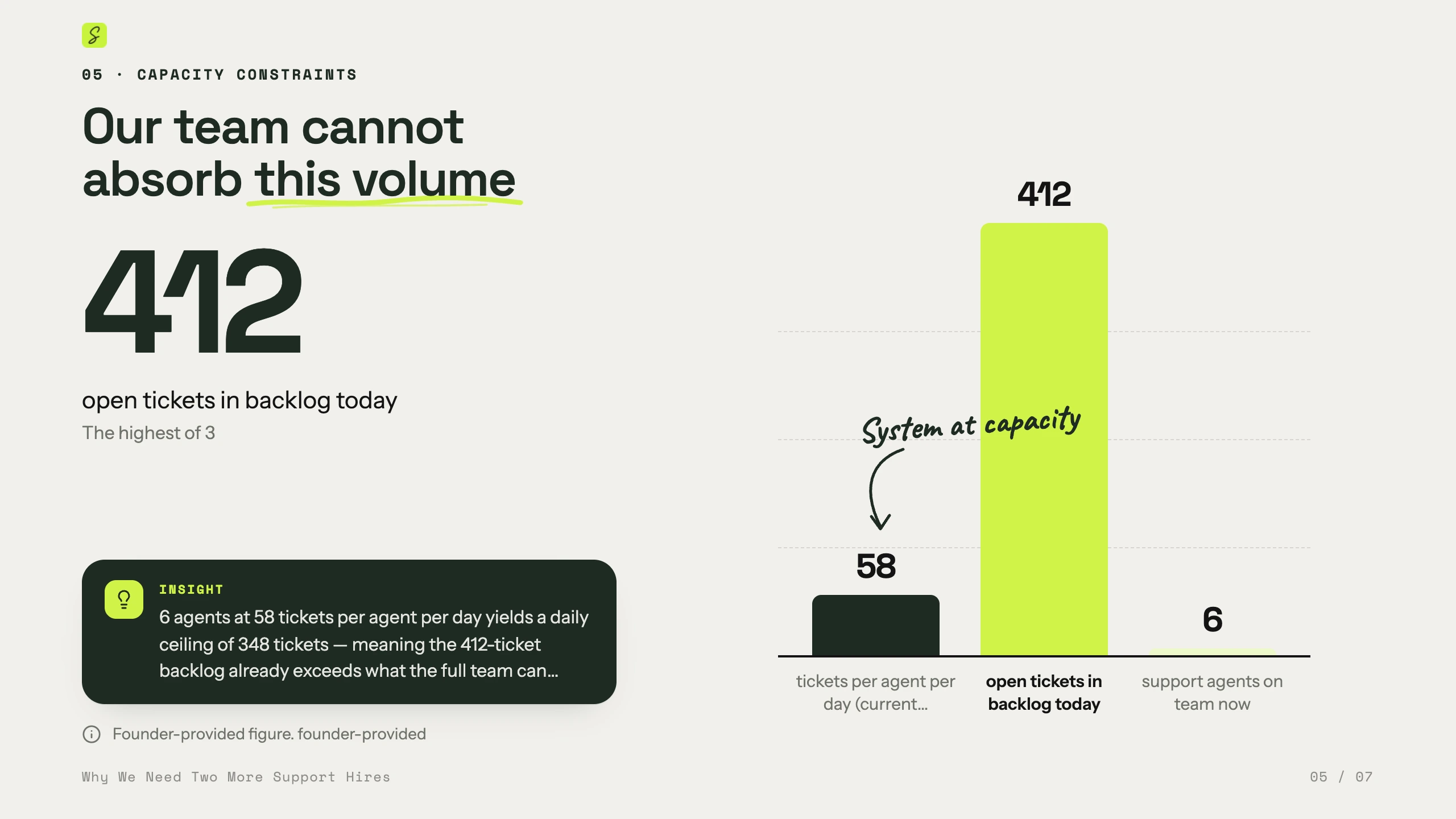
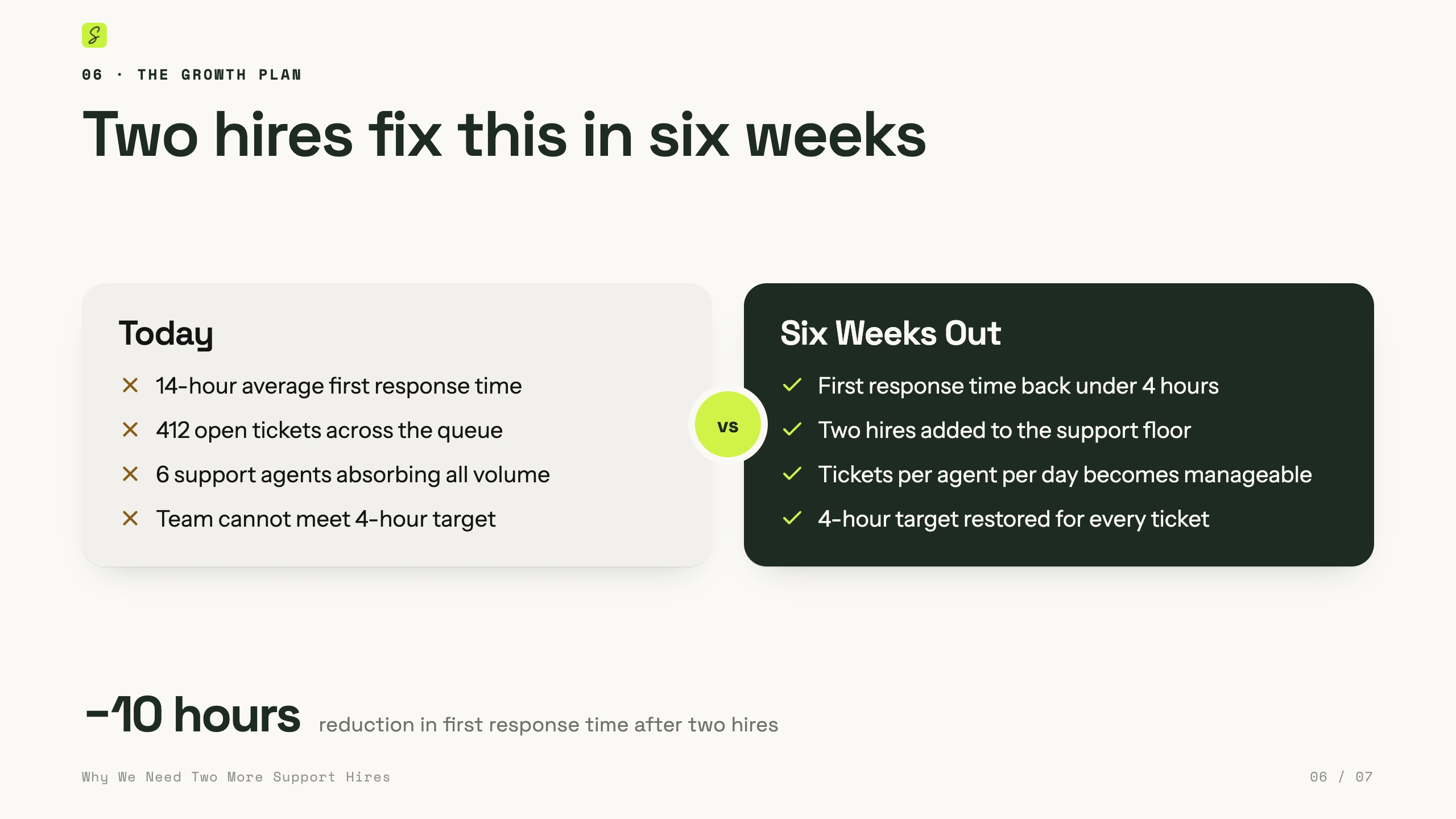
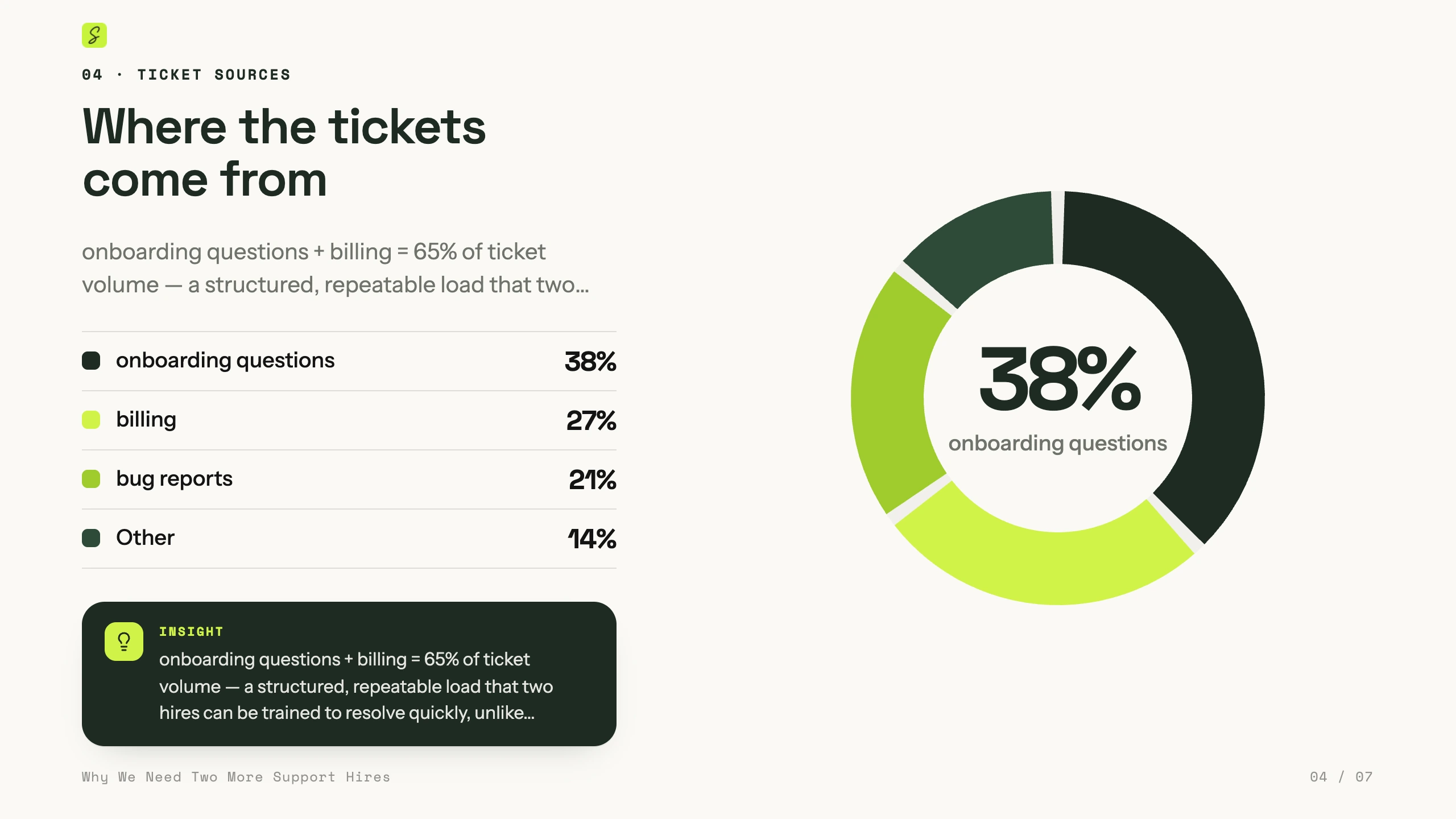
The support deck aboveIllustrated canvases, flows, multi-screen prototypes, working tools and decks, or changes to what’s already there. Ready in a few minutes.
Reads the board→Builds→Quick checkUsually 1–3 minThe social post studio and the rate calculatorThinks it through first: researches real sources, plans, builds, then tests and critiques its own work before you see it.
Plans→Researches→Builds→Tests→Fixes & citesUsually 3–8 minThe project health dashboard: 33 of 33 tests passHold two keys, say it, let go. It lands on your board, and every change comes with Undo.
Blocks and arrows, laid out for you. Mind maps, org charts and lists work the same way.
Point at something and say what should change: shorter, red, bigger, at the top.
Tasks go straight into your agenda, at the time you said. Notes go to Notes.
Bigger requests go to Ask AI. It picks Build or Deep build, and asks before it uses a Deep build.
Voice is part of Pro Creator and Team, and of the free week. On Free and Pro you can try it once. You can also dictate up to 10 minutes and get a tidy note back.
Your 9:00 AM leadership sync has a call link. One click opens the call and starts the notes. No bot joins the call.
You confirm you’ll tell the others. SketchMind copies the line for the chat, and Chrome asks which tab to listen to.
A small recorder sits on top of the call: a red dot, the sound of the call, the time and Stop. Nothing to type or click.
Stop saves the recording to your Notes. SketchMind turns it into text and puts names to the voices, from the invite and from what was said. Then the audio is deleted.
The gist first, then what was discussed and what each person said. Next steps get an owner, and a date when one was said. One click puts yours in your agenda.
 Today · SketchMind
Leadership sync
+
Today · SketchMind
Leadership sync
+

 Mark, Priya and youMarkPriyaYou
Heads-up: I’m taking notes of this call with SketchMind. It turns what’s said into text; the audio is deleted once the text is made. Tell me if you’d rather I didn’t.
Fine by me.
Sure, go ahead.
SketchMind turns what everyone says into text. Tell the others before you start, and stop if someone objects.
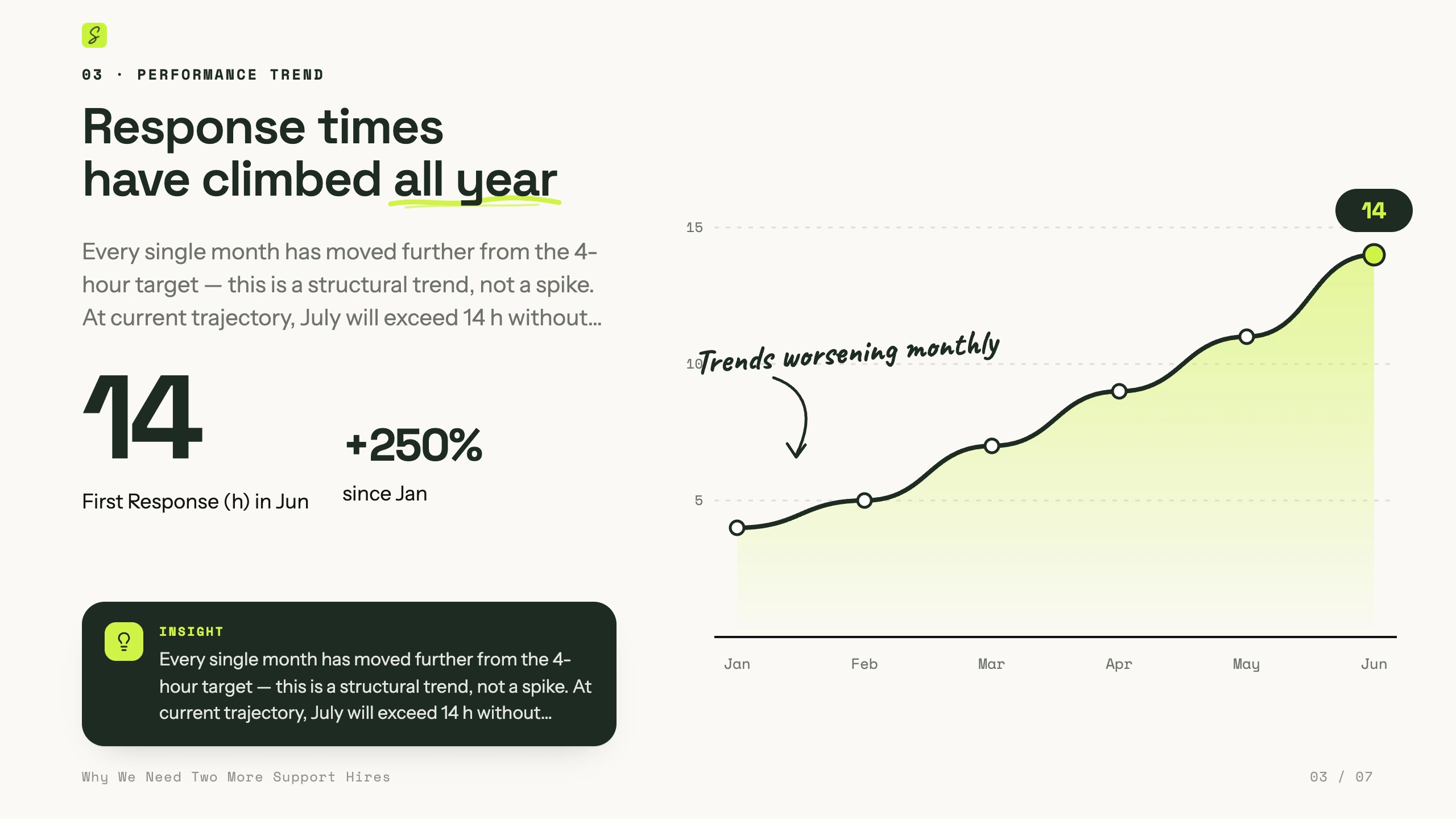
Today · SketchMindLeadership syncYouMarkPriyaRecognising who spoke…Mark and Priya agree that a 14-hour first reply is too slow. Two support agents start in January, which should bring it back to about four hours.
MarkHead of OpsPriyaMarketingFri 30 Octin your agendaMon 2 Novin your agendano dateNames come from the invite and from what was said. Click one to change it everywhere.
Recreated from the app · the people are illustrative
One sentence becomes a flow, an ad funnel, a checklist or a designed presentation on your board. If a fact is missing it asks first, and everything stays editable.
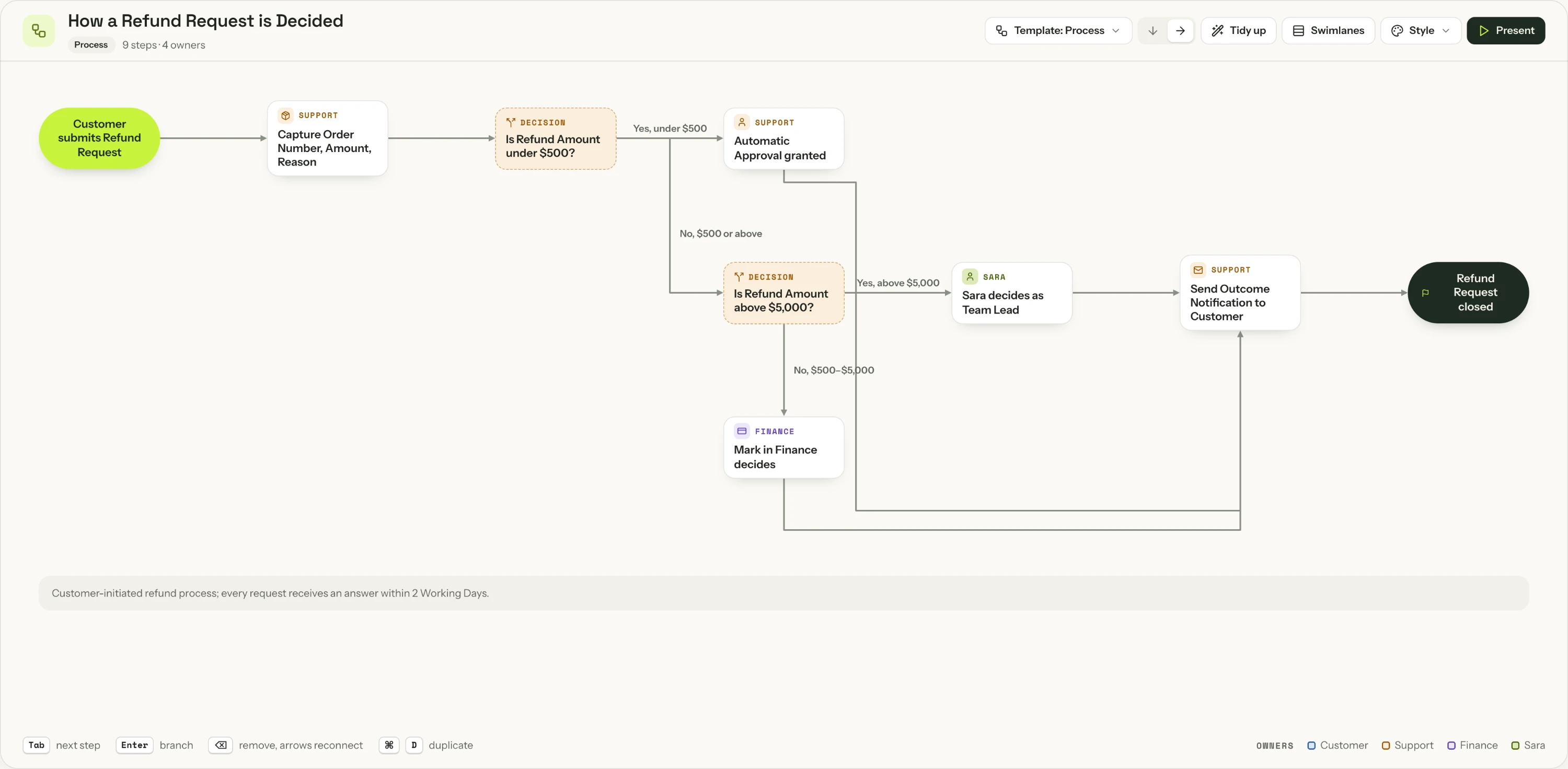
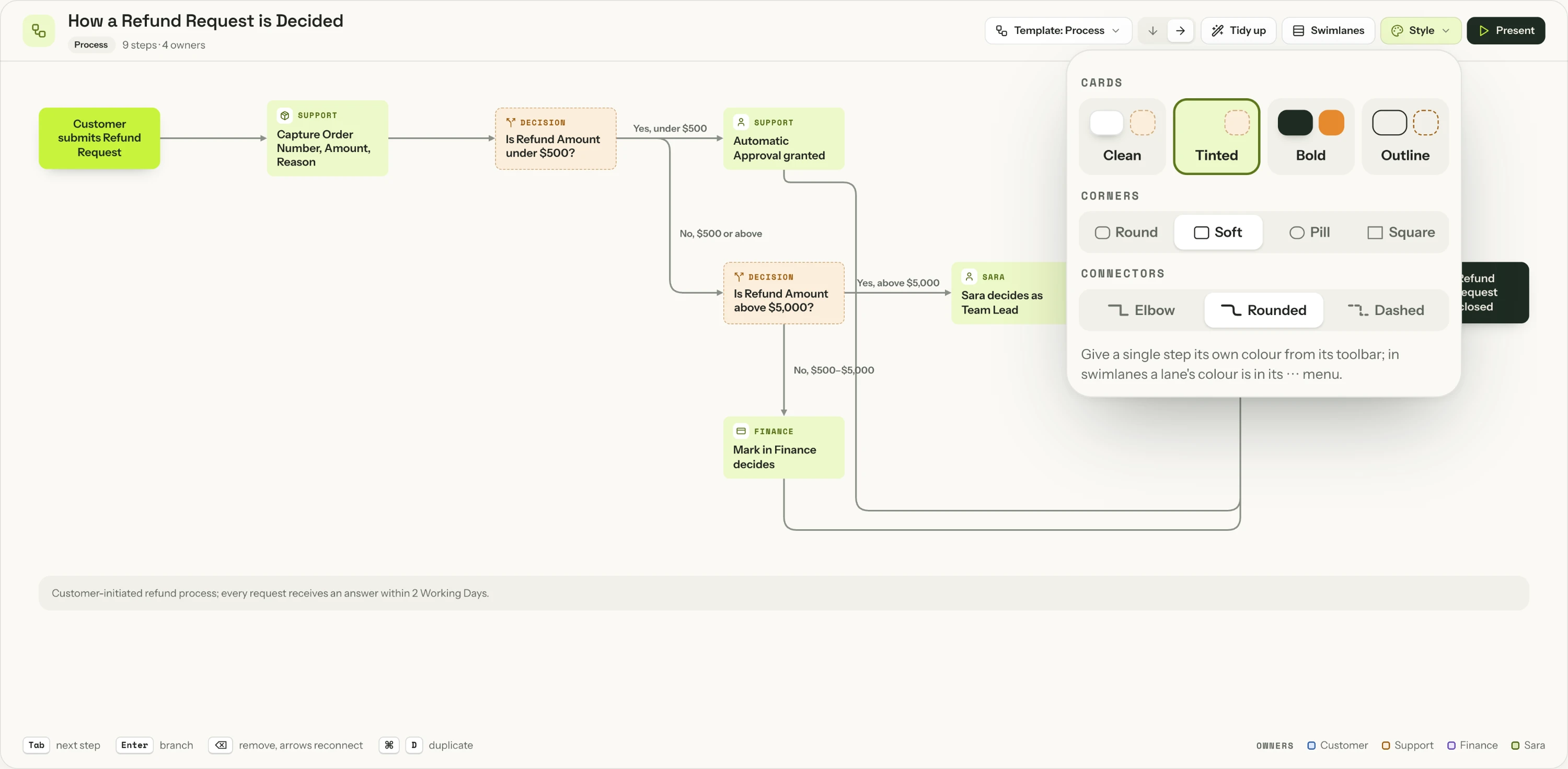 Real output · captured from the app
Quick turns a sentence into one editable flow. Switch the template or the style in one click; the steps and the text stay the same.
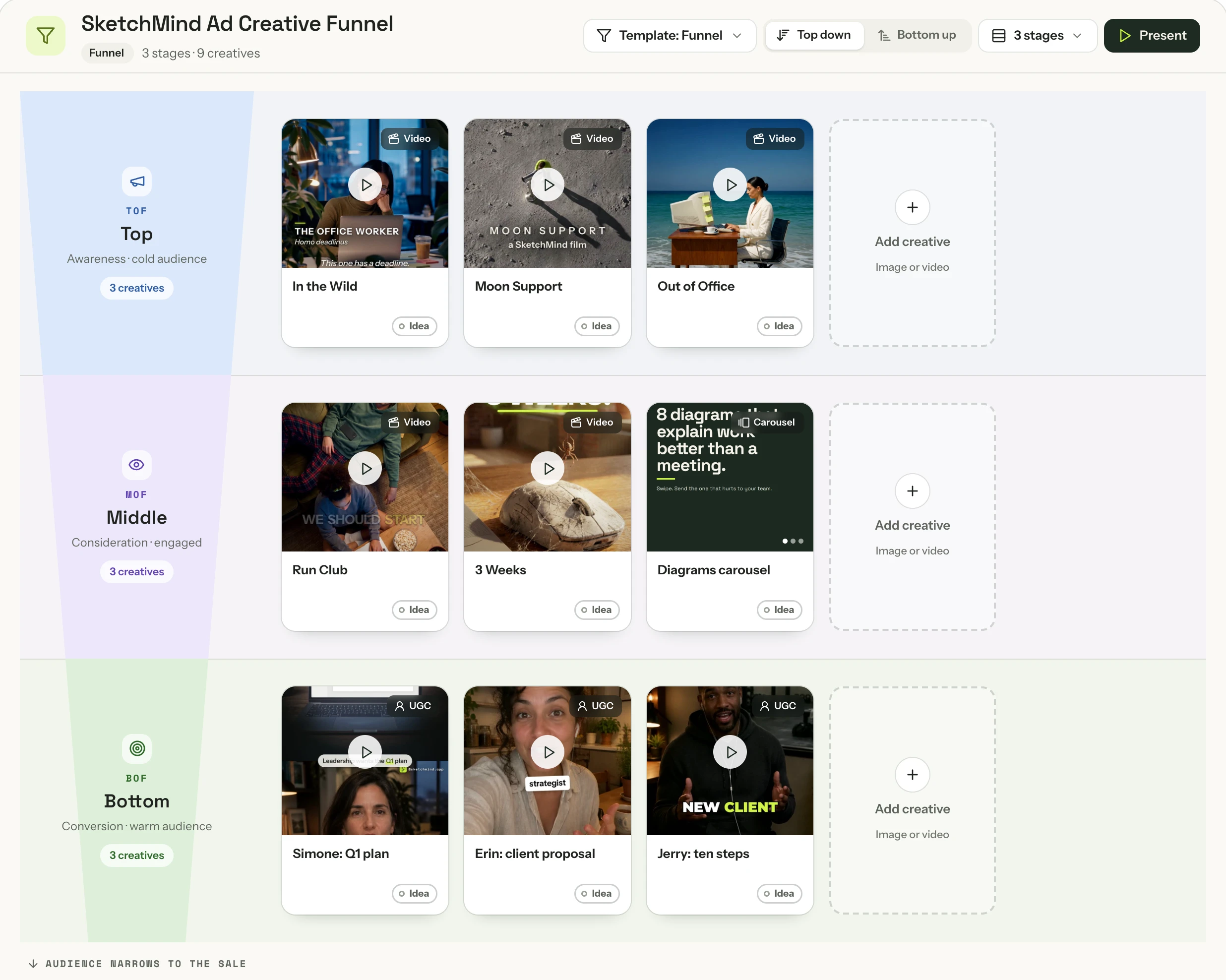 Real output · our own ads
Ask for a funnel, or switch any flow to the Funnel template. Drop in your ads as images or videos, and every ad becomes a card you plan, test and track.
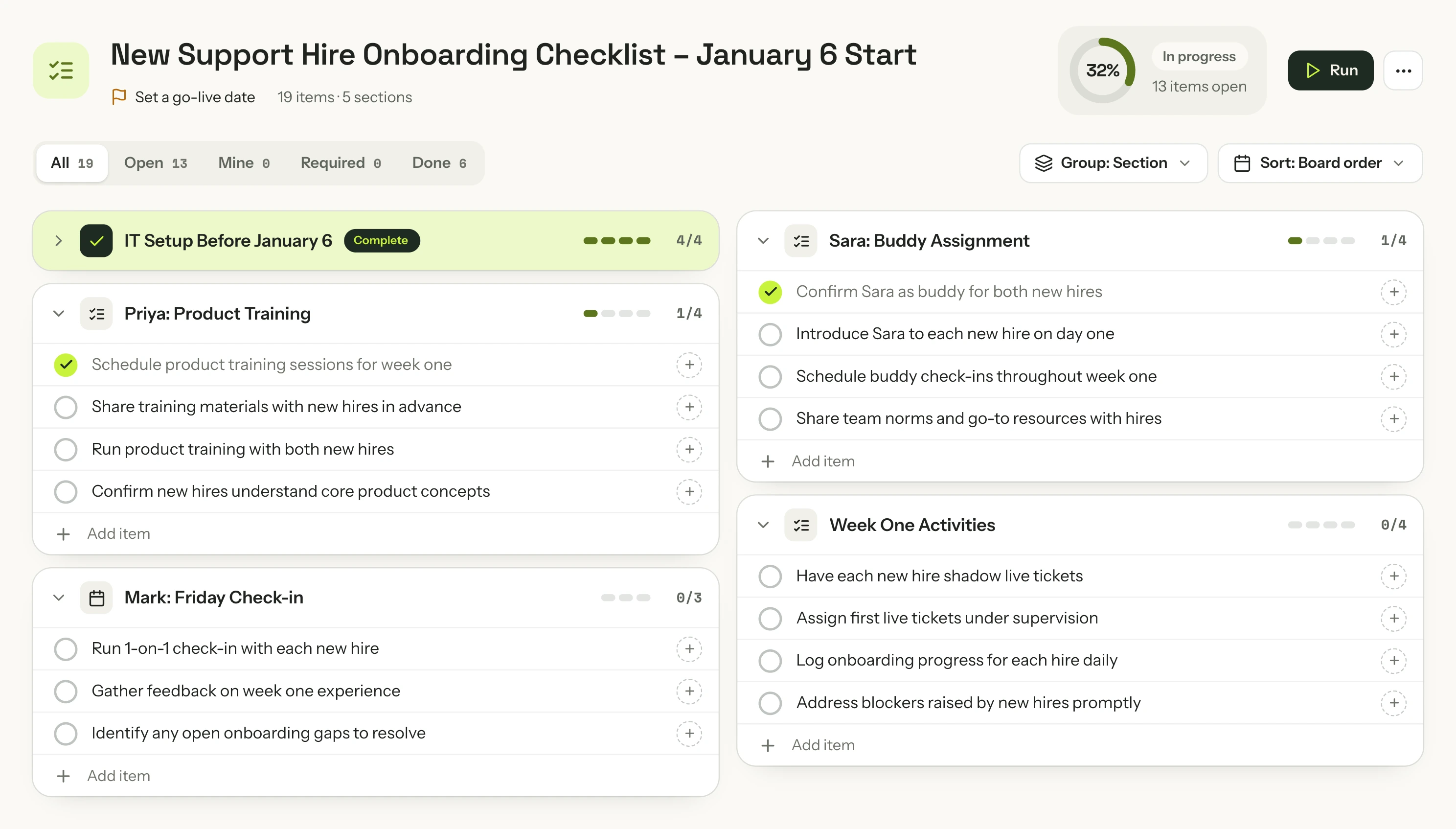 Real output · captured from the app
Owners, due dates and a go-live gate, in one frame you tick off together.
Quick writes a 6–8 slide deck and designs every slide for what it says. In Present, headlines roll in, charts draw themselves and cards build one click at a time.
Invite your team or a client to the board. Everyone sees who is where, and nobody overwrites anyone.
@Priya can you check the start date with the hiring managers?
Day to year views and Plan my day, with your Google, Apple or Outlook calendar next to it.
Phases, weeks or milestones. Every step has an owner and lands on their agenda.
Turn a board into a document, or write one yourself. Export to PDF, Word or Google Docs.
Press N for a quick note, or dictate one. To-dos tick straight into your agenda.
15, 25 or 45 minutes on one thing. Start it on a board, from a task in your agenda, or with your voice.
The same workspace everywhere. On a tablet, write and draw with a pen.
Free week of Pro Creator: 3 Builds, 1 Deep build and voice, so you can try it on your own work. Card required, $0 today. *Fair use, about 200 AI boards a month.
Founding offer: the first 1,000 paying subscribers lock the $49 Pro Creator price permanently. Not a discount — a lock against every future increase.

The thinking was never the slow part — the tool was. SketchMind gives you a finished, presentable result in seconds, so your time goes to what you want to say.
Ask AI works three ways. Quick makes one ready-made frame in seconds: Frames, a Presentation (Pro), a Flow or a Checklist. Build makes anything you describe in 1–3 minutes, from a calculator or a dashboard to a clickable prototype or a deck. Deep build researches real sources first and tests its own work before you see it, in 3–8 minutes. Everything lands on your board and stays editable.
It's built not to. When a fact is missing — a number, a date, who approves what — SketchMind asks before it writes. Anything you skip is written as a question to confirm, and figures you gave are labelled as yours.
Yes. The build clips are real recordings from SketchMind, and the decks, flows, funnels and checklists were generated in SketchMind and captured straight from the app. The social post studio in the Build scene is the real output of a Build, running live on this page. The app around it, and the voice, meeting-notes and collaboration scenes, are rebuilt from the app’s own screens and marked “Recreated”. The profile photos are illustrative.
Only on your own device, and only until the notes are written. After Stop, SketchMind turns the recording into text, works out who said what and writes the summary, the decisions and the next steps. Then the audio is deleted; only the text is kept. No bot joins your call. It works with Meet, Zoom and Teams in Chrome or Edge on a computer; on other browsers and on your phone it notes what your microphone hears. Tell everyone before you start: SketchMind gives you a line to paste in the call’s chat.
Yes. The Free plan is free forever: 5 boards, 5 AI boards, 5 AI rewrites and 10 handwriting conversions, with no credit card. The AI allowances on Free are one-time; monthly allowances start with Pro.
No. Your boards are private by default and we don't use your boards or prompts to train our own models. See the Privacy Policy.
Type it in one sentence. SketchMind builds the deck, the board or a working tool for you.
Free account · no credit card