Describe what you need.SketchMind builds it.

Ask in plain words. SketchMind builds the board, the presentation, even a working tool, and asks for any facts it needs first. Your tasks, plans and goals live in the same workspace, on computer, phone and tablet.

Builds it straight away · 1–3 minFree account · no card
Free forever planDesktop, phone & tabletViewers never need an account
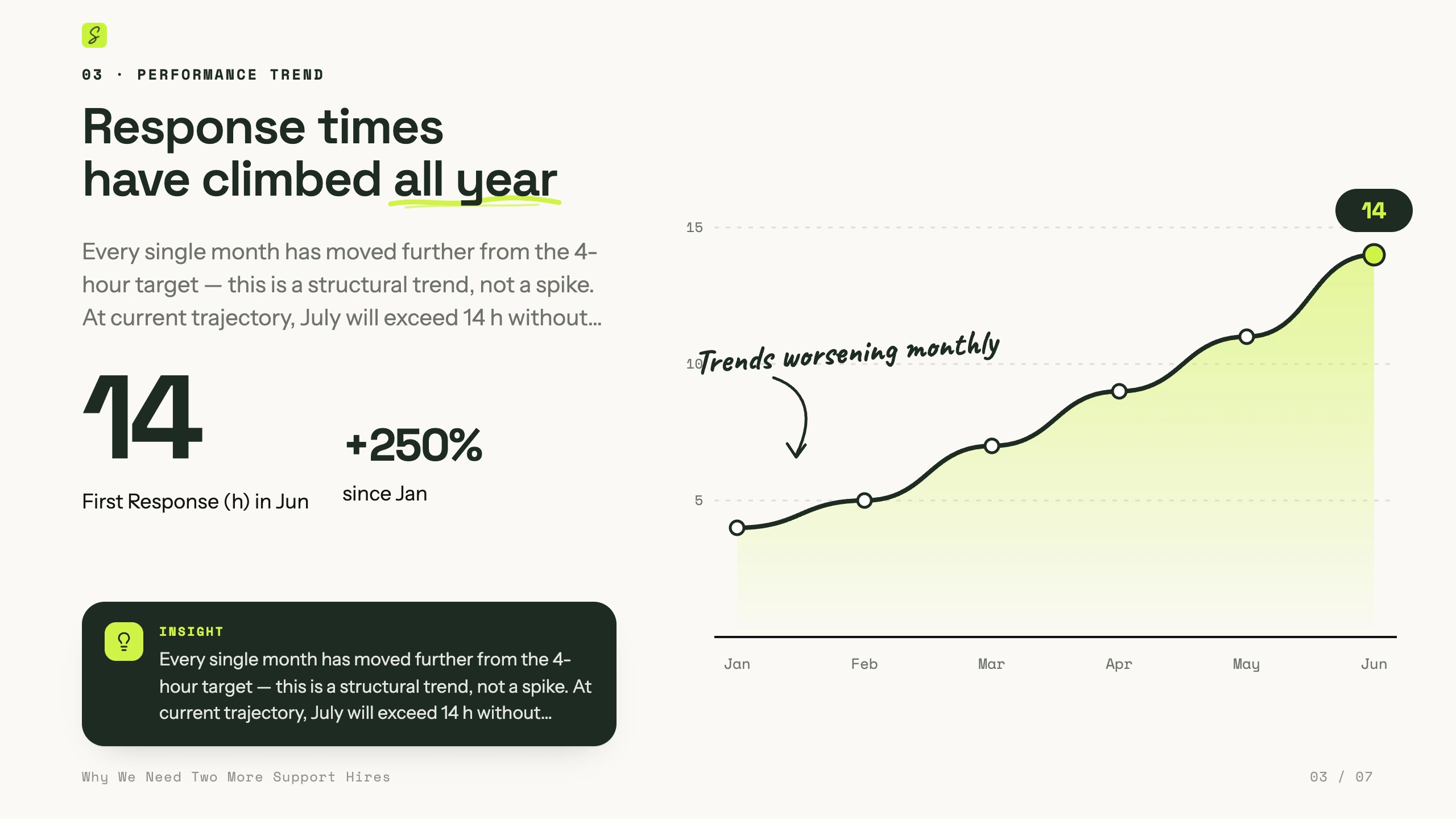
Slide: Response times have climbed all year. A line chart from January to June that rises to 14 hours, +250% since January.
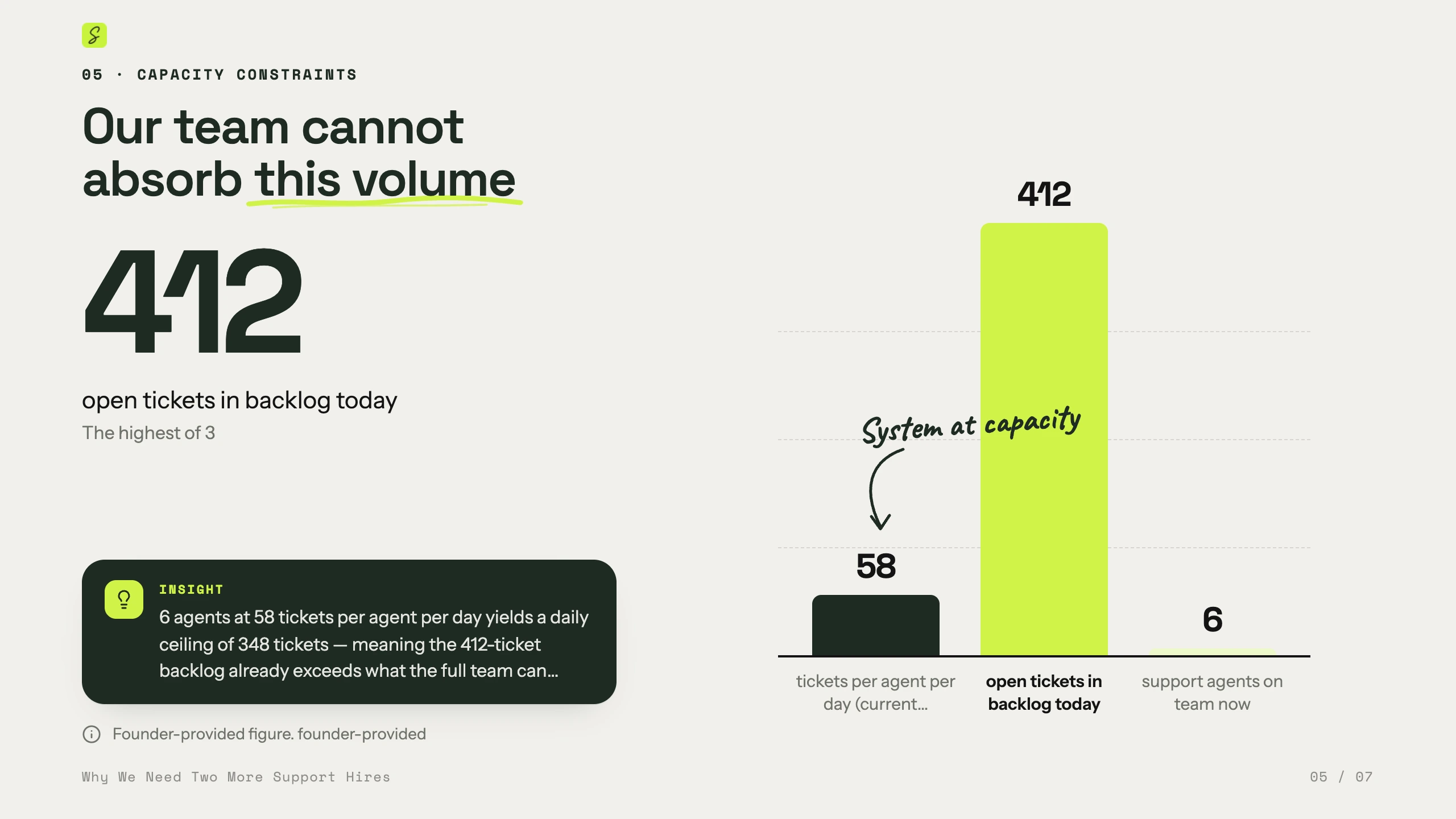
Slide: Our team cannot absorb this volume. A bar chart with 412 open tickets in the backlog next to 58 tickets per agent a day and 6 agents.
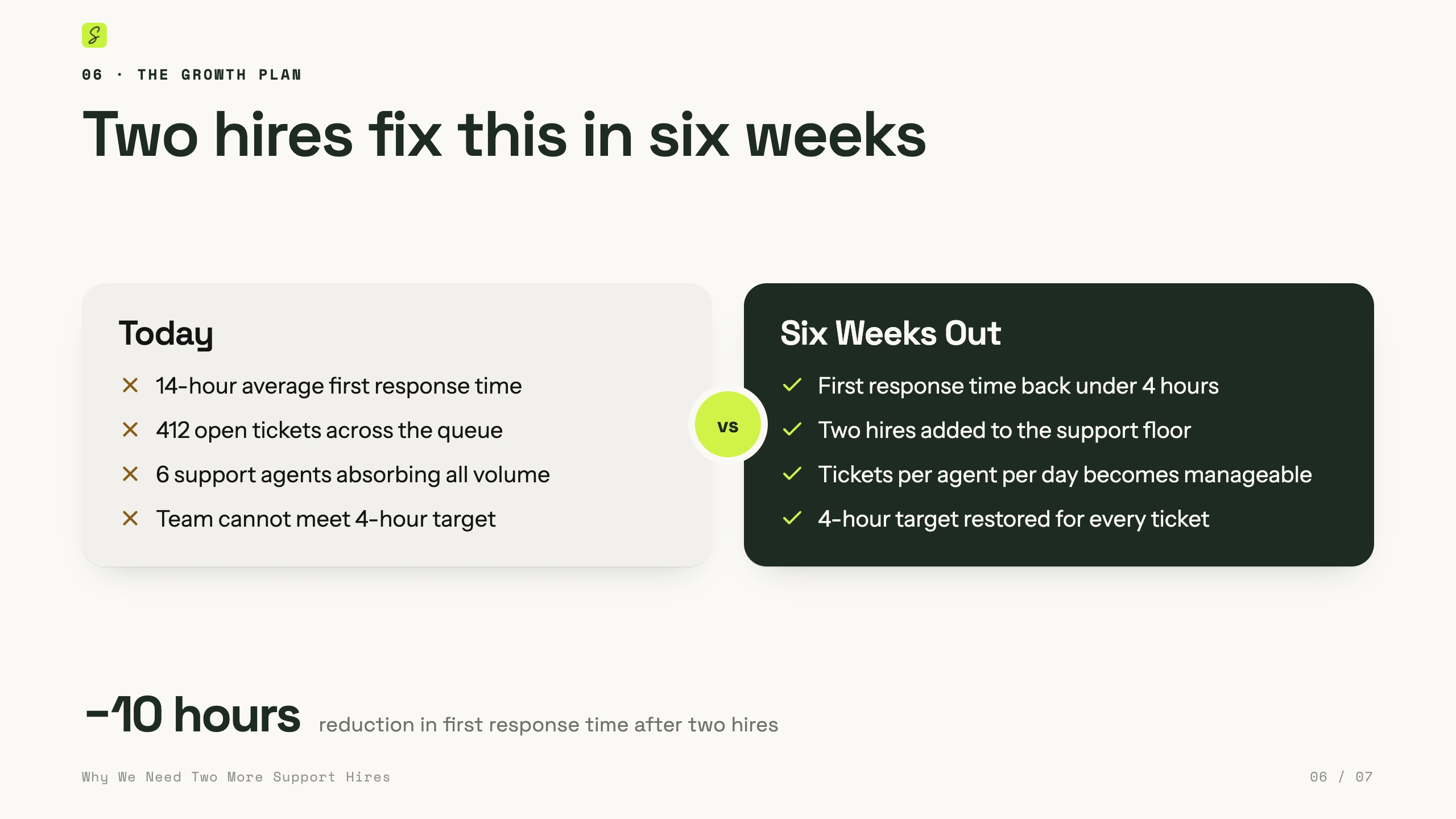
Slide: Two hires fix this in six weeks. Today versus six weeks out, side by side.
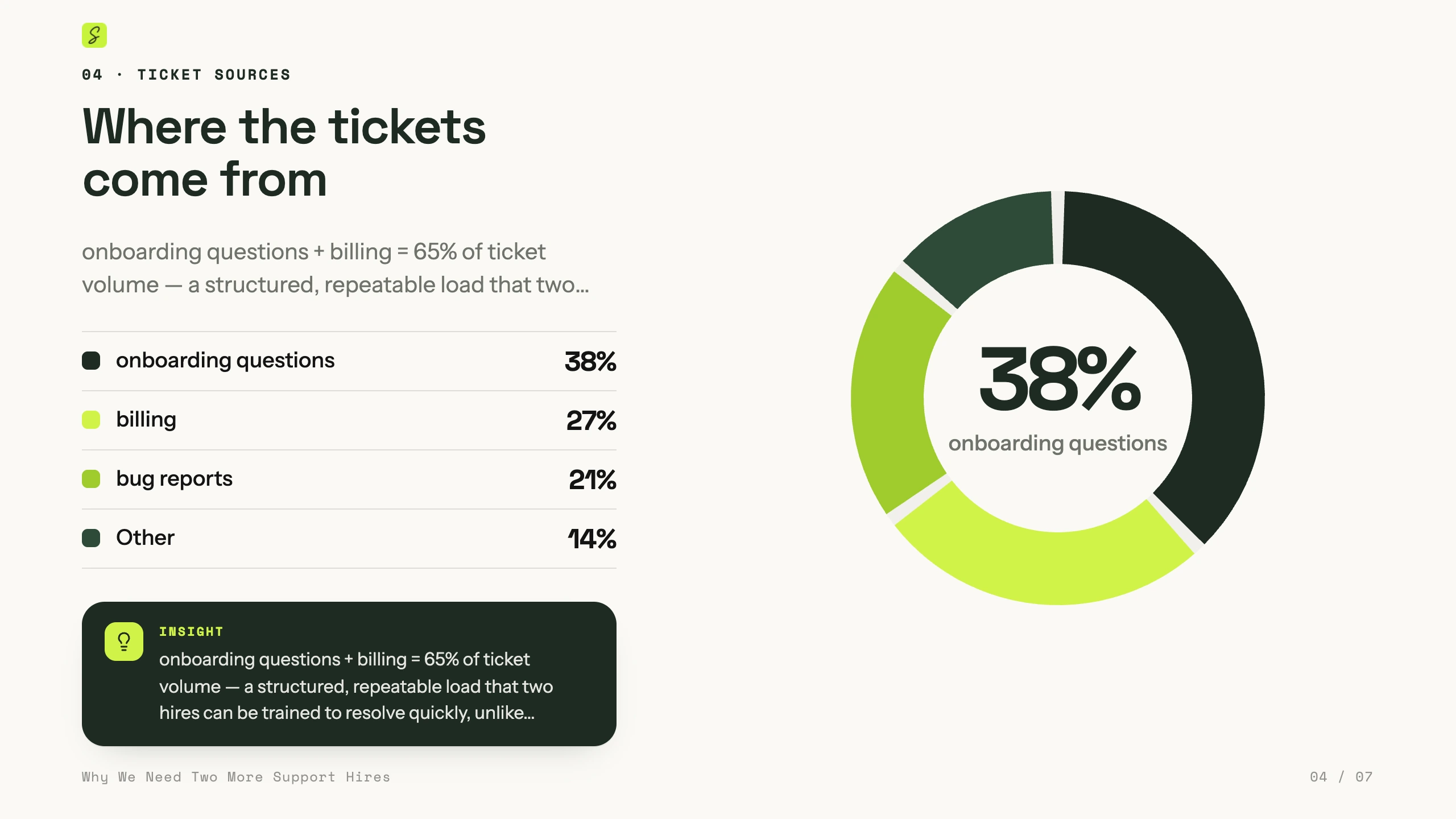
Slide: Where the tickets come from. A donut chart: onboarding questions 38%, billing 27%, bug reports 21%, other 14%.
Real output Slides SketchMind made from a sentence — with the charts it picked itself
The night before

You know what to say.
You just can't get it on a slide.

Slides or a document?
Which template?

Still fixing the layout.

Starting from a blank page takes hours.SketchMind makes it ready to present.

Describe it in one sentence. You get the finished deck, or a working tool on your board.

NewAsk AI · Build & Deep build

Describe the tool you need.
Build makes it work.

1 · Ask once, with Build

One sentence. No setup.

Ask Build for the tool your team keeps wishing it had: write a post once, preview it on every channel, plan the week.

2 · It builds on your board

Watch it come together.

Build reads your board, then designs and builds a working studio right next to your notes. Usually in 1–3 minutes.

3 · Write once

Every channel updates as you type.

LinkedIn, Instagram and X previews, each with its own character limit. One click adds a saved hashtag set.

4 · Plan the week

Pick a day, a time and a status.

Add it to the week planner: a row per channel, every post marked Draft, In review or Scheduled.

5 · It’s yours

Not a mockup. A tool you can use.

This is the studio Build made, running live on this page. Open it and try it yourself.

← BoardsLaunch week: social postsRecreated from a real BuildJShare
Social post studioLive prototype
The agent is building this prototype…
Ask AI or create something…
Ask AIResearches, designs, draws and builds on this board
QuicksecondsBuildNEWbuilds fastDeepNEWthinks it through
Build a social post studio: one post, live LinkedIn, Instagram and X previews, then a week planner per channel.
Reading the board
New canvas: Social post studio (1440×960)
Building a live prototype: Postwise Studio
Writing more of the prototype
Finishing the prototype
Looking closely at Postwise Studio
Built on your board

I built a working social post studio on the board. Write a post once and the LinkedIn, Instagram and X previews update as you type, each with its own character limit. Saved hashtag sets add tags in one click, and every post lands in a week planner with a row per channel.

Working…
The agent is building…
AI
QuickSeconds · a new ready-made frame
Build NEWBuilds anything you describe · fast
Deep build NEWResearches, reasons, verifies · thorough
Frameson your boardPresentationdesigned slidesFlowone frameChecklistone frame
Builds what you describe, fast: illustrated canvases, flows, multi-screen prototypes, working tools, decks, or changes to what’s already here. Ready in a few minutes.
Ask, change or build anything on this board…Build
Attach PDF, Excel/CSV, Word or images · Enter to build
Real builds

One sentence in.
A working tool out.

Every clip is a real Build or Deep build, recorded in SketchMind. Under each one is what we asked for.

Deep build

Project health dashboard

Build a project health dashboard for a 6-person team shipping on 15 December. Test every rule.33 of 33 tests pass

Build

Freelance rate calculator

I’m a freelance brand designer. Build a rate calculator that turns my target income into a day rate and an invoice.Rates, chart and invoice
Build + Deep build

Refund desk, working prototype

Build a working prototype of our new refund process, then test every route yourself: $320, $1,200 and $9,000.Built in 6 min 27 s
Deep build

Colour and type lab

A brand colour and type lab for designers. Check the WCAG contrast of every pair and test the formula first.8 of 8 contrast tests pass
Build + Deep build

Launch planner, with sources

Build a working campaign planner for our launch on November 3, then research the best time to post, with sources.Built in 9 min 48 s
Deep build

Marathon plan, 16 weeks

Plan our first marathon. Sixteen weeks, every level.Built in 3 min 52 s
Build

Pace-group finder

We’re forty now. Make a pace-group finder. The dog leads the slow group.Built in 1 min 42 s
Deep build

Last 90 Days goal board

A goal dashboard to finish 2026 strong. Research what makes streaks work and cite it.Built in 9 min 10 s
Build and Deep build come with Pro, Pro Creator and Team. The free week includes 3 Builds and 1 Deep build.✦ Build yours
Three ways to ask

Seconds for a frame. Minutes for the real thing.

Pick how much work you want done. Everything lands on your board, and everything stays editable.

Quick

Seconds · a new ready-made frame

Frames, a presentation, a flow or a checklist, straight onto your board.

The support deck above
NEW

Build

Builds anything you describe · fast

Illustrated canvases, flows, multi-screen prototypes, working tools and decks, or changes to what’s already there. Ready in a few minutes.

Reads the board→Builds→Quick checkUsually 1–3 minThe social post studio and the rate calculator
NEW

Deep build

Researches, reasons, verifies · thorough

Thinks it through first: researches real sources, plans, builds, then tests and critiques its own work before you see it.

Plans→Researches→Builds→Tests→Fixes & citesUsually 3–8 minThe project health dashboard: 33 of 33 tests pass
NewVoice · hold ⌥ ⌘

Just say it.
The board does it.

1 · Add

“Add a sticky: hire before the Q1 peak.”

Hold two keys, say it, let go. It lands on your board, and every change comes with Undo.

2 · Draw

“Draw the flow from new ticket to solved.”

Blocks and arrows, laid out for you. Mind maps, org charts and lists work the same way.

3 · Change

“Make it shorter.”

Point at something and say what should change: shorter, red, bigger, at the top.

4 · Plan

“Remind me to send the deck to Mark tomorrow at 10.”

Tasks go straight into your agenda, at the time you said. Notes go to Notes.

5 · Build

“Build a cost calculator for the two hires.”

Bigger requests go to Ask AI. It picks Build or Deep build, and asks before it uses a Deep build.

← BoardsSupport: the case for two hiresRecreated from the appJShare
Support: the case for two hires
Notes for tomorrow’s leadership sync
Backlog412 tickets waiting
First response14 hours, target 4
Hire before the Q1 peak
We should probably think about hiring two more people before the busy season starts, because the backlog keeps growing every week.Hire two people before Q1.
New ticket
Triage
Answer
Solved
Agenda Tomorrow
Leadership sync9:00 AM · 30 min
Send the deck to Mark10:00 AM · task
Ask AIResearches, designs, draws and builds on this board
Build a cost calculator for the two hires.
Reading the board
Building a live prototype: Hiring cost calculator
Working…
The agent is building…
You say
Let go to sendesc
Working it out…
Undo

Voice is part of Pro Creator and Team, and of the free week. On Free and Pro you can try it once. You can also dictate up to 10 minutes and get a tidy note back.

NewVoice & meeting notes

The meeting starts.
Nobody has to take notes.

No bot joinsThe audio is never savedPro Creator & Team
1 · From your agenda

Join the call with notes.

Your 9:00 AM leadership sync has a call link. One click joins it and starts the notes. No bot joins the call.

2 · Before you start

Everyone in the call knows.

You confirm you’ll tell the others. SketchMind copies the line for the chat, and Chrome asks which tab to listen to.

3 · While you talk

It writes down what’s said.

Everyone’s words appear as text in a small window on top of the call. Mark a moment or add a note of your own.

4 · Lost the thread?

Ask “What did I miss?”

A short recap of the last minutes, while the call goes on.

5 · When you stop

Summary, decisions, next steps.

The decision is written down. Next steps get an owner and a date. One click puts yours in your agenda.

Today · SketchMind Leadership sync +
app.sketchmind.app/today
Agenda · Today
Leadership sync
9:00 – 9:30 AM
Mark, Priya and you
Join Google Meetmeet.google.com/abc-defg-hij
Join with notesThe words of the call, a summary and the next steps
Sharing this tab to app.sketchmind.appStop sharingHide
Mark · Head of Ops
Priya
You
People
In call · 3
Mark
Priya
You
You 9:01 AM

Heads-up: I’m taking notes of this call with SketchMind. It turns what’s said into text; the audio isn’t saved. Tell me if you’d rather I didn’t.

Mark 9:01 AM

Fine by me.

Priya 9:01 AM

Sure, go ahead.

Send a message
9:01 AM | abc-defg-hij
Line copied: paste it in the call’s chat
Notes for this call
Leadership sync · Google Meet
  1. Pick the tab with your callChrome asks which tab to share. Nothing is shown to the others.
  2. Keep “Also share tab audio” onThat is how we hear the others. Your own voice comes from your mic.
  3. Your notes stay on top of the callA small window you can type in, mark moments and stop.
Other people are in this call

SketchMind turns what everyone says into text. Tell the others before you start, and stop if someone objects.

I’ll tell everyone that I’m taking notes with SketchMind
Copy a line for the chat so the others know
Start notes
Choose what to share with app.sketchmind.app
Chrome tabWindowEntire screen
Leadership sync – Google Meet
Today · SketchMind
Q4 plan.pdf
Leadership sync
Also share tab audioCancelShare
Call notes
Leadership sync: two support hires
Today 9:00 · 24 min
Google MeetNo audio kept, text only
Summary
  • First response time is 14 hours and the backlog is 412 tickets.
  • Two support hires should bring response time back to about four hours.
  • Payback is based on $3,600 a year for every customer kept.
Decisions
  • Hire two support agents, starting in January.
Next steps
Draft the job postFri 24 Octin your agenda
Ask Finance for the hiring budgetMon 27 Octin your agenda
Mark: sign off the January startno date
Add 2 tasksTasks added
Put on a board
Copy the summary
Ask about this call
What did Mark say about the cost?
In Home › Notes and Documents › Notes. Only you see it, until you share it.
2 tasks in your agenda · Fri 24 and Mon 27 Oct

Recreated from the app · the people are illustrative

Quick

Need one thing, fast?
Quick makes one finished frame.

One sentence becomes a flow, an ad funnel, a checklist or a designed presentation on your board. If a fact is missing it asks first, and everything stays editable.
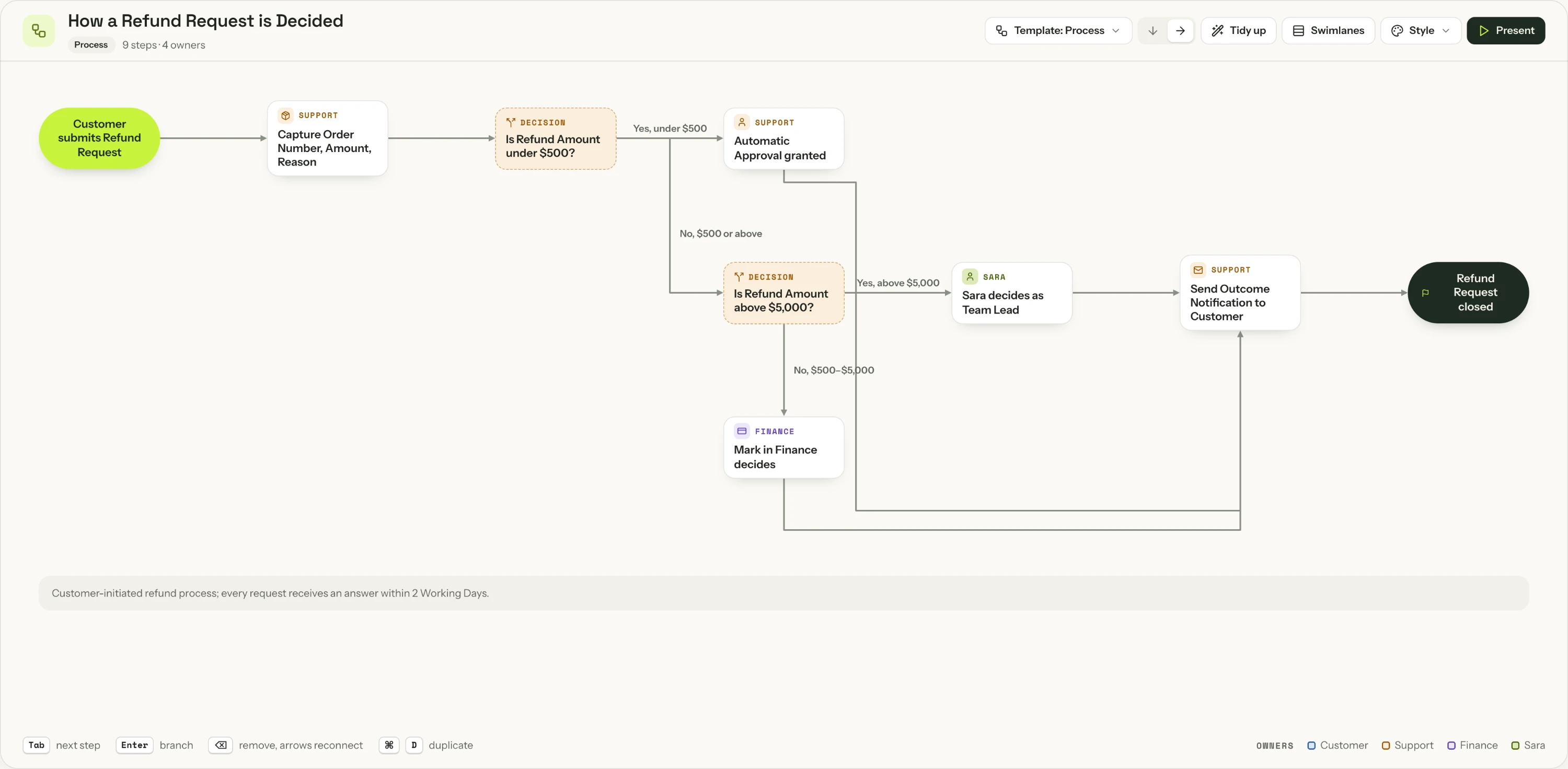
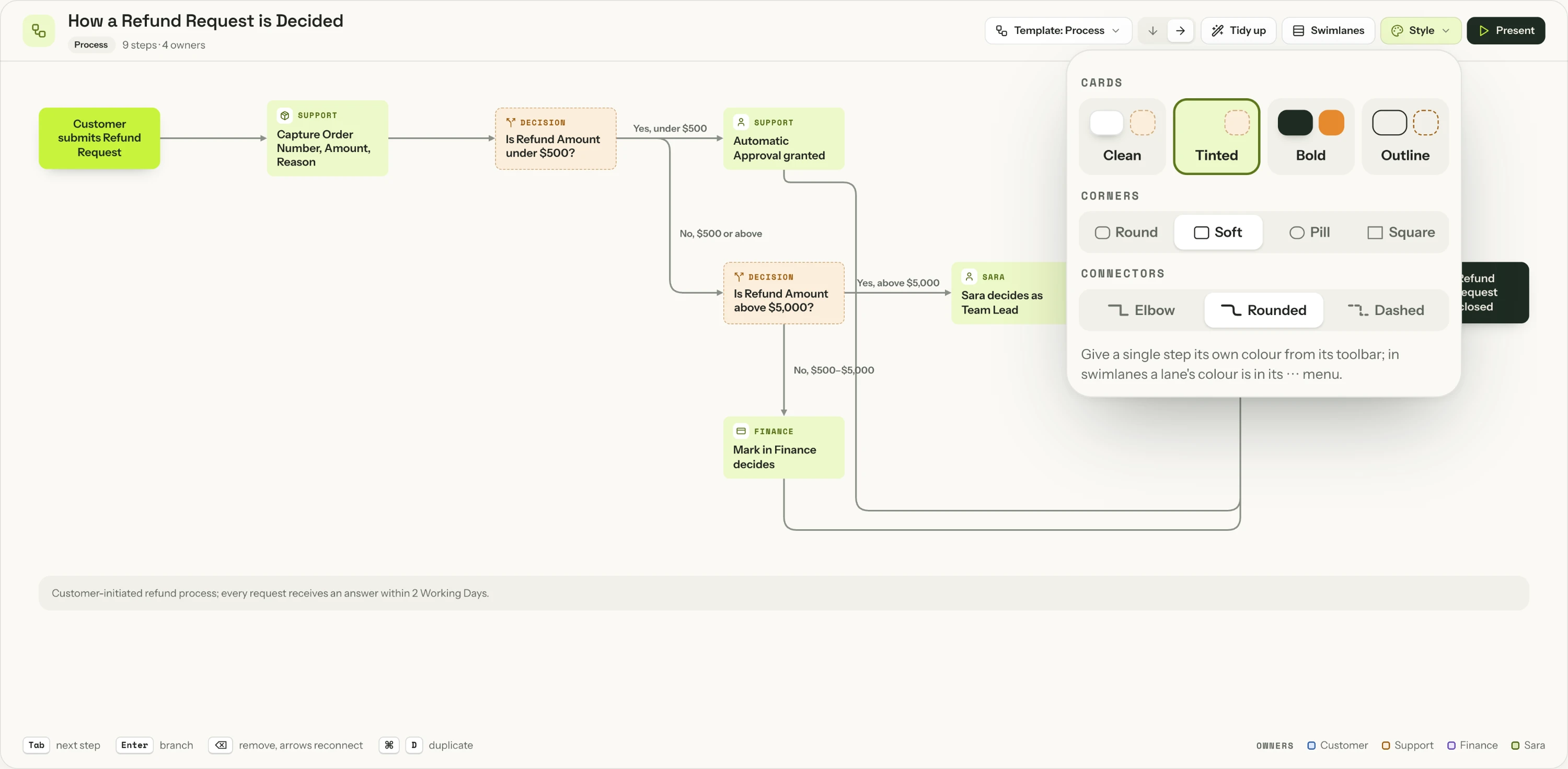
A flow made with Quick in SketchMind: how a refund request is decided, with two decisions and an owner on every step.The same flow with the Style menu open: Tinted cards, Soft corners and Rounded connectors.Real output · captured from the app

One sentence. A flow you can reshape.

Quick turns a sentence into one editable flow. Switch the template or the style in one click; the steps and the text stay the same.
  • Process, Decision tree, Swimlanes, Org chart, Mind map, Customer journey or Funnel
  • Four card styles, four corner shapes and three kinds of connectors
  • Every step can have an owner. Tab adds the next step, Enter adds a branch
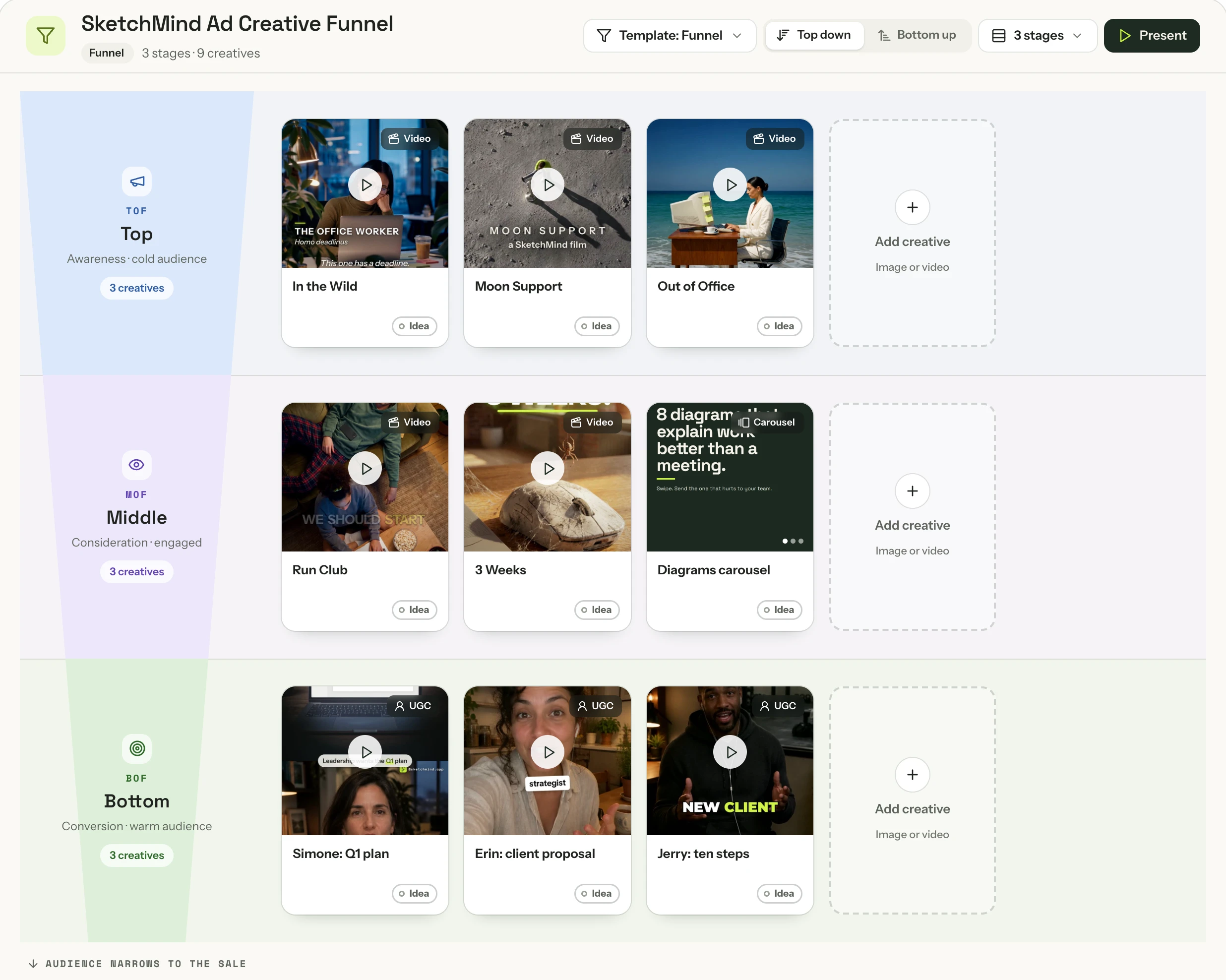
A funnel made in SketchMind: SketchMind's own ad creatives sorted into TOF, MOF and BOF, each with its format and status.Real output · our own ads

Your ad funnel, at a glance.

Ask for a funnel, or switch any flow to the Funnel template. Drop in your ads as images or videos, and every ad becomes a card you plan, test and track.
  • TOF, MOF and BOF, or name the stages yourself
  • Video, static, carousel or UGC, each marked Live, Test, Paused or Idea
  • Hook, audience, CTA and result on every creative. A video’s first frame becomes its thumbnail
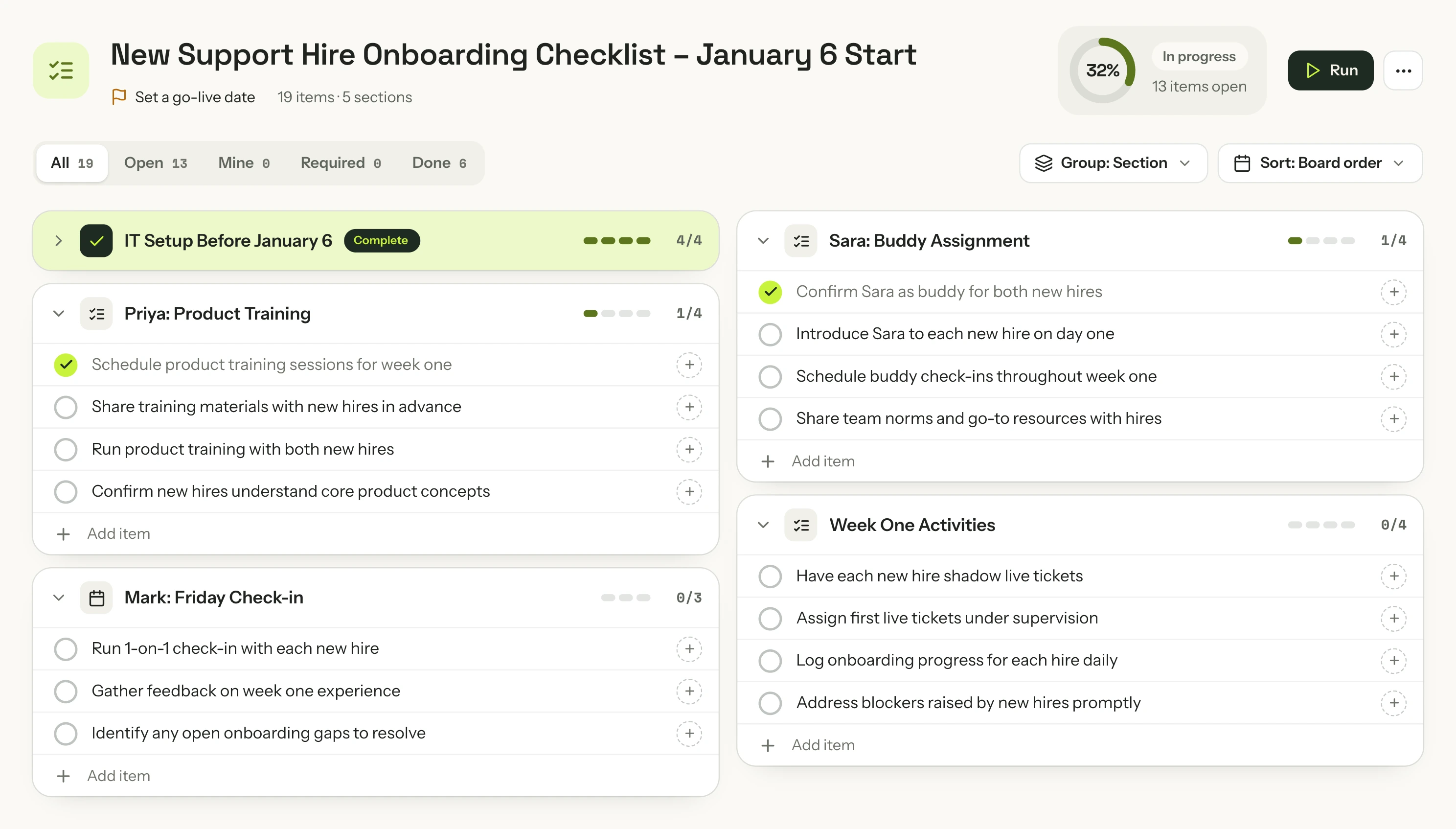
A checklist made with Quick in SketchMind: onboarding two new support hires, grouped by owner, 32% done, with filters and a Run button.Real output · captured from the app

A checklist that knows when you’re ready.

Owners, due dates and a go-live gate, in one frame you tick off together.

  • Required items decide Ready or Not ready
  • Run it one item at a time: Done, Skip or Waiting
  • An item with an owner and a date lands on their agenda, with a reminder
Real slides · playing like in Present

Slides that move, the way you present them.

Quick writes a 6–8 slide deck and designs every slide for what it says. In Present, headlines roll in, charts draw themselves and cards build one click at a time.

  • Line, bar and donut charts that build step by step
  • Speaker notes, a rehearse timer and an “Ask the room” card
  • A figure that isn’t in your text stays blank. It is never invented.
Together

Work on it together,
live.

Invite your team or a client to the board. Everyone sees who is where, and nobody overwrites anyone.

  • Live cursors with namesSee who is working where, on a computer, tablet or phone.
  • One editor per elementSomeone is typing in it? Tap Notify me and get it the moment they’re done.
  • Comments with @mentionsPin a comment on anything. The person you mention gets a notification.
  • Share by link or inviteViewer or editor, per board or for a whole folder.
← BoardsQ1 hiring planRecreated from the appSPTShare
Q1 hiring plan
BudgetSSara
Interviews3 rounds, one panel
StartBoth start on January 6
OnboardingTwo weeks with a buddy
OwnerPriya runs the interview loop
RiskHolidays slow down offers
T
TTom · just now

@Priya can you check the start date with the hiring managers?

Priya
Tom
SSara is editing this.
It opens for you as soon as they're done.
Sara is done. You can edit it now.
Notify meWe'll tell you×
Pricing

Start free. Upgrade
when you need more.

Monthly Annual ~2 months free
Free
Try it: 5 boards, 5 AI boards, share with anyone.
$0
Free forever. No card needed.
Quick5 boards, one-time
BuildNot included
Deep buildNot included
VoiceTry it once
  • 5 boards
  • 5 AI rewrites (one-time)
  • 10 handwriting conversions (one-time)
  • Unlimited documents you write yourself
  • Every example board, to use and copy
  • 2 editors per board
  • Unlimited viewers
Start free
Pro
Your own work, unlimited.
$19/mo
Or $190 a year — about two months free.
Quick20 a month
Build8 a month
Deep build3 a month
VoiceTry it once
  • Unlimited boards
  • 100 AI rewrites per month
  • 3 AI document exports (PDF) per month
  • Unlimited documents you write yourself
  • Unlimited handwriting conversion
  • 3 editors per board
  • Unlimited viewers
Choose Pro
★ MOST POPULAR
Pro Creator
Your whole team, your brand, ready to share.
$49/mo
Or $490 a year — about two months free.
QuickUnlimited*
Build25 a month
Deep build8 a month
VoiceIncluded
Meeting notes20 hours a month
Need more? $1.99 per Build, $3.99 per Deep build.
  • Everything in Pro
  • Unlimited AI rewrites
  • Unlimited AI document exports (PDF)
  • Unlimited editors per board
  • Brand kit
  • Early access to new features
Choose Pro Creator
Team
One workspace, one bill, everyone included.
$39/seat/mo
$36 per seat from 10 seats. 3–24 seats self-serve.
QuickUnlimited*
Build25 a month each
Deep build8 a month each
VoiceIncluded
Meeting notes20 hours each
Need more? $1.99 per Build, $3.99 per Deep build.
  • Everything in Pro Creator, per member
  • Shared team folders
  • Team brand kit
  • Admin console: members, roles, offboarding
  • Add or remove seats any time
  • Unlimited viewers, no seat needed
Start a team

Free week of Pro Creator: 3 Builds, 1 Deep build and voice, so you can try it on your own work. Card required, $0 today. *Fair use, about 200 AI boards a month.

Included on every planAgendaGoalsFocus timerBoard activityPhone & tablet

Founding offer: the first 1,000 paying subscribers lock the $49 Pro Creator price permanently. Not a discount — a lock against every future increase.

No credit card to startCancel, upgrade or downgrade whenever30-day money-back on annual25+ seats? Talk to us
Jesse Simons, founder of SketchMind
The thinking was never the slow part — the tool was. SketchMind gives you a finished, presentable result in seconds, so your time goes to what you want to say.
Jesse, founder

Questions, answered.

What exactly does the AI make?

Ask AI works three ways. Quick makes one ready-made frame in seconds: Frames, a Presentation (Pro), a Flow or a Checklist. Build makes anything you describe in 1–3 minutes, from a calculator or a dashboard to a clickable prototype or a deck. Deep build researches real sources first and tests its own work before you see it, in 3–8 minutes. Everything lands on your board and stays editable.

Does it make things up?

It's built not to. When a fact is missing — a number, a date, who approves what — SketchMind asks before it writes. Anything you skip is written as a question to confirm, and figures you gave are labelled as yours.

Are the images on this page real?

Yes. The build clips are real recordings from SketchMind, and the decks, flows, funnels and checklists were generated in SketchMind and captured straight from the app. The social post studio in the Build scene is the real output of a Build, running live on this page. The app around it, and the voice, meeting-notes and collaboration scenes, are rebuilt from the app’s own screens and marked “Recreated”. The profile photos are illustrative.

Does SketchMind record my calls?

No audio is saved. SketchMind turns what’s said into text while the call runs, then writes the summary, the decisions and the next steps. No bot joins your call. It works with Meet, Zoom and Teams in Chrome or Edge on a computer; on other browsers and on your phone it notes what your microphone hears. Tell everyone before you start: SketchMind gives you a line to paste in the call’s chat.

Is it really free?

Yes. The Free plan is free forever: 5 boards, 5 AI boards, 5 AI rewrites and 10 handwriting conversions, with no credit card. The AI allowances on Free are one-time; monthly allowances start with Pro.

Do you train AI on my boards?

No. Your boards are private by default and we don't use your boards or prompts to train our own models. See the Privacy Policy.

Try it now

What do you want to build?

Type it in one sentence. SketchMind builds the deck, the board or a working tool for you.

Free account · no credit card
BuildDeep buildPresentationFlowChecklist