
Content calendars: how to plan a month of posts without a spreadsheet
What a content calendar needs, how to plan a month of posts with one owner each, what to do when a post slips, and why spreadsheet calendars go stale.
- A content calendar is a dated list of posts, each with a channel and one owner; tracking systems bolted on top are what usually kill it.
- Plan a month by picking one theme per week, a cadence you can keep, and one name per post.
- Two or three posts a week that go out beat five that don't; three a week is 12 to 13 posts a month.
- Keep two evergreen posts in reserve, so a slipped post doesn't leave a gap.
- In SketchMind, Create with AI drafts the ideas on a board, and Plans drafts the steps from that board so you can move them to your Agenda.
A content calendar sounds like a system. In practice it is usually a spreadsheet that was accurate for eleven days: the posts moved, the columns didn't, and now it describes a month that never happened.
Short answer: A content calendar is a dated plan of what you will publish, on which channel, and who makes each piece. To plan a month of posts, pick a theme per week, set a cadence you can keep, give every post one owner and a date, and hold two evergreen posts in reserve for the weeks when something slips. Keep it where the team looks every day, not in a file nobody opens after week one.
What is a content calendar?
A content calendar is a dated list of posts with a channel and an owner for each. The definition matters because most templates add a second job: tracking ideas, briefs, drafts, approvals and performance in the same grid. That second job is what kills the first one. A calendar you have to maintain is a calendar you'll abandon.
A working content calendar answers three questions at a glance: what goes out this week, who is making it, and what happens if something slips. If your setup can't answer the third without a meeting, it is only a schedule.
What should a content calendar include?
Each entry needs five fields: the date, the channel, the post, the owner and a status. Anything else, like the full brief or the performance numbers, can live somewhere else and be linked.
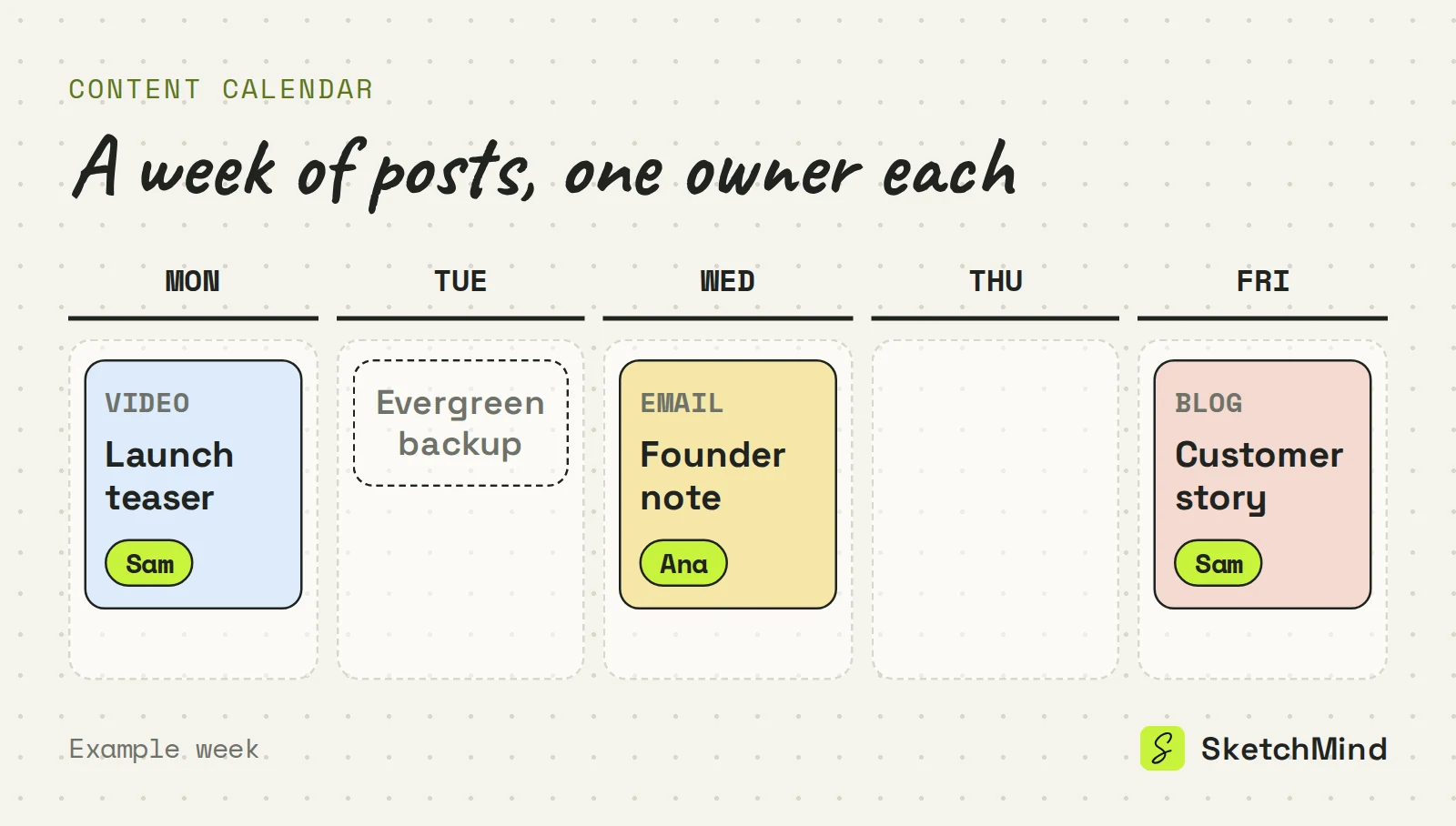
Example: one week of a content calendar
|Day|Channel|Post|Owner|
|---|---|---|---|
|Mon|Short video|Launch teaser|Sam|
|Wed|Newsletter|Founder note: why we built it|Ana|
|Fri|Blog|Customer story, before and after|Sam|
Three posts a week is 12 to 13 posts a month. That is enough to build a habit and few enough that one person can review the whole month in five minutes.
How do you plan a month of content?
Plan a month by working from themes to dated posts, then assigning owners before anything is written.
- Pick one theme per week. Four themes are easier to fill than 12 unrelated slots. A product launch, a customer story and a how-to week already cover most of a month.
- Set a cadence you can keep. Two or three posts a week that actually go out beat five that don't. Put them on fixed days.
- Put one name on every post. "Marketing" is not an owner. One person who will say "that's mine" is.
- Write two evergreen posts first. These are pieces that work in any week, and they are your buffer when a planned post isn't ready.
- Review once a week. Fifteen minutes on Monday: what shipped, what moved, what's next.
If the themes are still fuzzy, start with a brainstorm on a board before you date anything. Brainstorming templates covers how to get past the empty boxes.
Why do content calendars die in spreadsheets?
They die because a spreadsheet stores dates without connecting them to anyone's day. Week one, every cell is filled in. Week two, one post slips, every date after it is now wrong, and nobody owns updating 30 cells, so nobody does. Week three, the team stops looking, because the calendar and the actual work no longer match.
Where a content calendar can live
|Tool type|Good at|Breaks when|
|---|---|---|
|Spreadsheet|Many columns, filters, sorting|Dates shift and nobody updates the cells|
|Shared document|Briefs and drafts next to the plan|You need to see the week at a glance|
|Board plus a dated agenda|Ideas and dates in one place, visible to owners|The team never opens it, like any tool|
What do you do when a post slips?
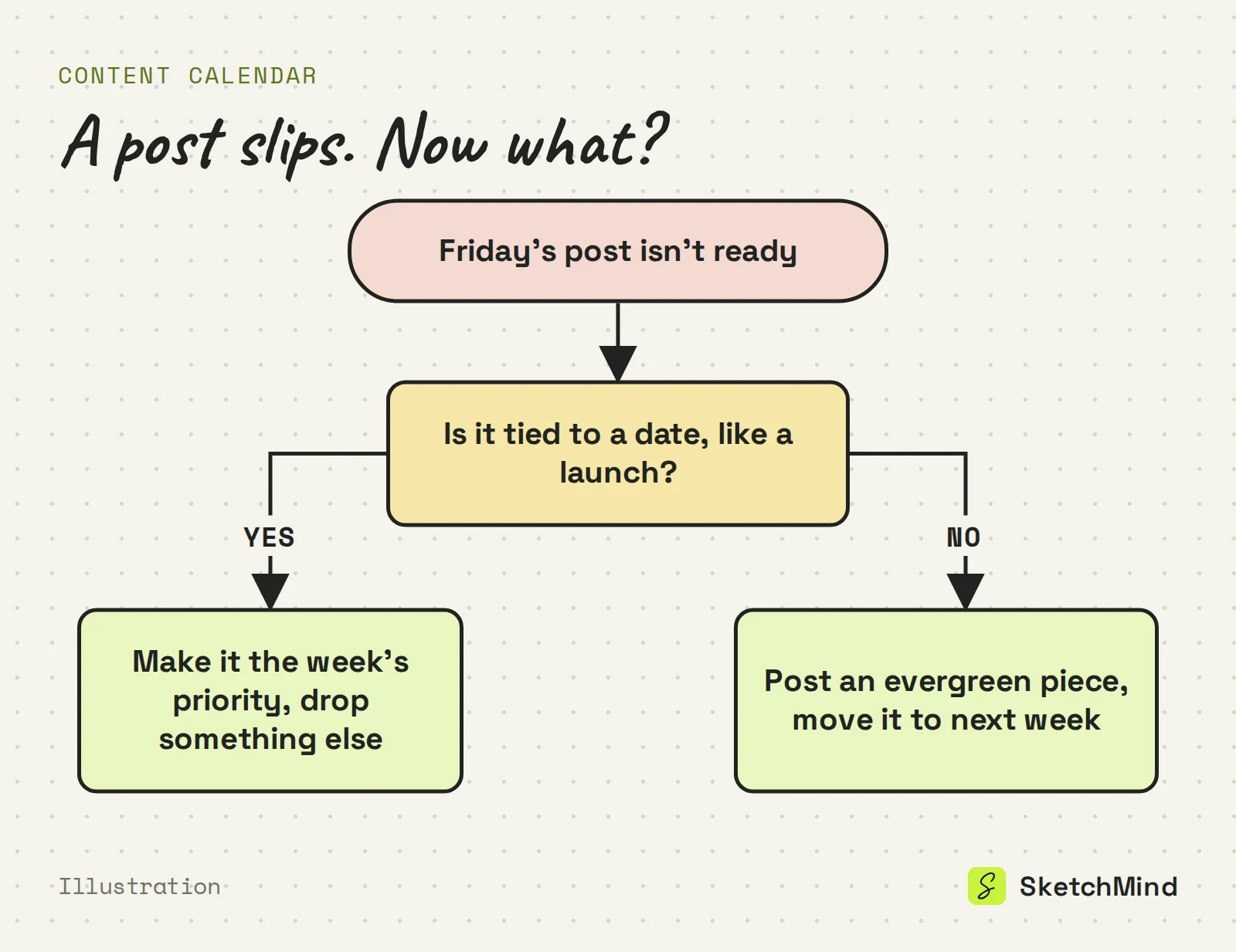
Decide whether the post is tied to a date. If it is, like a launch post, make it the week's priority and drop something else. If it isn't, publish an evergreen piece in its slot and move the late post to next week. Either way, update the calendar the same day, so it keeps matching reality.
How to plan a content calendar in SketchMind
SketchMind, an AI whiteboard, keeps the ideas and the dates in one workspace. Start with the ideas: open Create with AI and describe the month, your channels and the themes. Frames gives 4–8 editable frames in about 40 seconds, which works well as one frame per week's theme. Checklist gives one editable checklist frame in about 15 seconds, useful for the production steps behind each post. You can attach your content strategy as a PDF of up to 5 MB, and links in your prompt are read.
Then open Plans and choose + New plan. Plans starts from a board and drafts the steps for you, and you can move steps to your Agenda. The Agenda has day, week, month, quarter and year views, so a crowded week shows up before you get there. The Up next card shows the next step with Focus and Done, and the Focus timer runs 15, 25 or 45 minutes, or a custom length. Goals holds what the content is for, with progress taken from your agenda items. Agenda, Goals and Focus are included on every plan, and Plans sits beside them in the workspace. For a worked example of a plan people actually follow, see this action plan example.
Last updated: September 28, 2026. Checked against the current SketchMind app.
What is a content calendar?
A content calendar is a dated plan of what you will publish, on which channel, and who makes each piece. It answers what goes out this week, who is making it, and what happens if something slips.
What's the difference between a content calendar and a content strategy?
The strategy covers why and what: audience, channels and themes. The calendar covers when and who: dated posts with owners. The calendar should follow from the strategy.
How far ahead should I plan content?
A month is a practical horizon: long enough to see themes, short enough to stay accurate. Plan four weeks, run them, then plan the next month with what you learned.
How many posts should a content calendar have per week?
As many as you can publish every week without skipping. For most small teams that is two or three, which comes to 8 to 13 posts a month.
Can I plan a content calendar in SketchMind for free?
Yes, you can start free: the Free plan includes 5 AI-generated boards as a one-time allowance, with no credit card to start, and Agenda, Goals and the Focus timer are included on every plan.