
What is a one-pager? And how to make one that stays on one page
What a one-pager is, when to use one, the five blocks that go on it, and how to keep it on one page by making it visual instead of shorter.
- A one-pager is a single-page overview of one product, project or proposal that the reader takes in at once.
- Five blocks cover most one-pagers that work: headline, problem, approach, proof and ask.
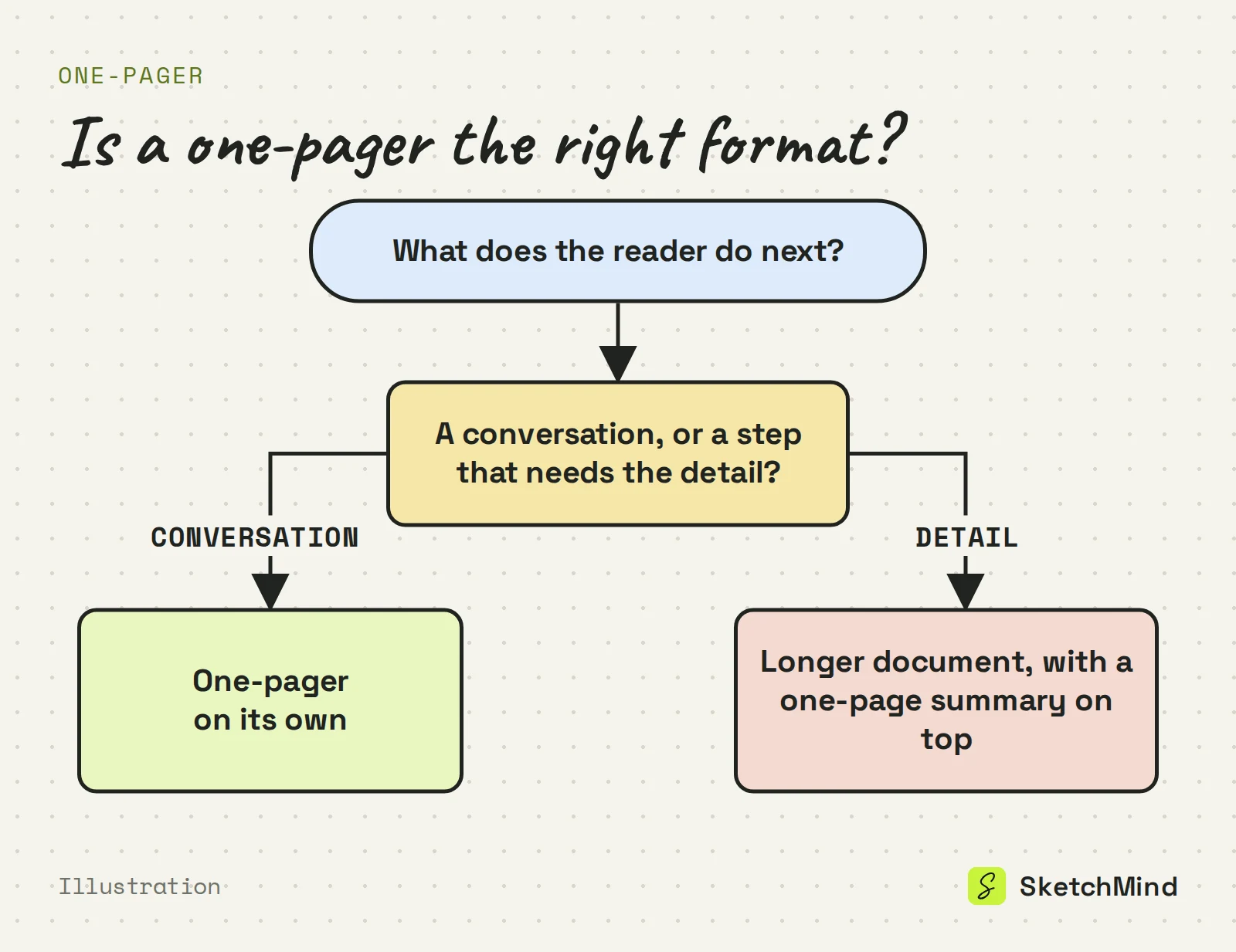
- Use a one-pager when the reader's next step is a conversation; when they need the detail, write the longer document and put a one-page summary on top.
- One-pagers grow because text editors invite completeness; laying the content out visually keeps it on one page.
- In SketchMind, Create with AI turns a short description into one editable Flow frame in about 20 seconds, which you can share by link, as a PNG, or present from the board.
Ask five people what a one-pager is and you will get five answers and, eventually, five documents that run to page three. The format has a simple promise, everything that matters visible at once, and a well-known failure mode: it keeps growing.
Short answer: A one-pager is a single-page overview of one product, project or proposal that a reader can take in at a glance. A good one has five blocks: a headline, the problem, your approach, proof, and a clear ask. If the reader's next step is a conversation, a one-pager fits; if they need the detail, write the longer document and put a one-page summary in front of it.
What is a one-pager?
A one-pager is a single-page overview of one thing: a product, a project, a proposal or a process. Its defining feature is simultaneity. The reader sees the whole story at once, without scrolling, flipping or clicking. That is why it works where it was built for: the executive with ninety seconds, the prospect who will not read a deck, the team that needs to agree on what the project actually is.
The form shows up under different names: a product one-pager for sales, a project brief for stakeholders, a one-page strategy for leadership, a fact sheet for an event. The discipline is the same each time. One page, one story, no appendix.
One-pager vs. executive summary vs. slide deck
|Format|Stands alone?|Best for|Typical length|
|---|---|---|---|
|One-pager|Yes|A fast decision on whether to hear more|1 page|
|Executive summary|No, it sits in front of a longer document|Condensing a report or proposal|1–2 pages|
|Slide deck|Usually needs a presenter or notes|Walking a group through an argument|Often 10–20 slides|
If the one-pager does its job and leads to a meeting, a presentation outline is the natural next step.
When should you use a one-pager?
Use a one-pager when the reader decides quickly and the decision is whether to hear more. Sales leave-behinds, internal pitches, project kickoffs and partner intros all fit, because the alternative is a document nobody opens.
It is the wrong format when the substance needs space: a technical design, a contract, a research report. Compressing those onto one page does not clarify them. It hides the parts someone needed to read. The test is simple. If the reader's next step after a good one-pager is a conversation, the format fits. If their next step requires the detail you cut, write the longer thing and put a one-page summary in front of it.
What should a one-pager include?
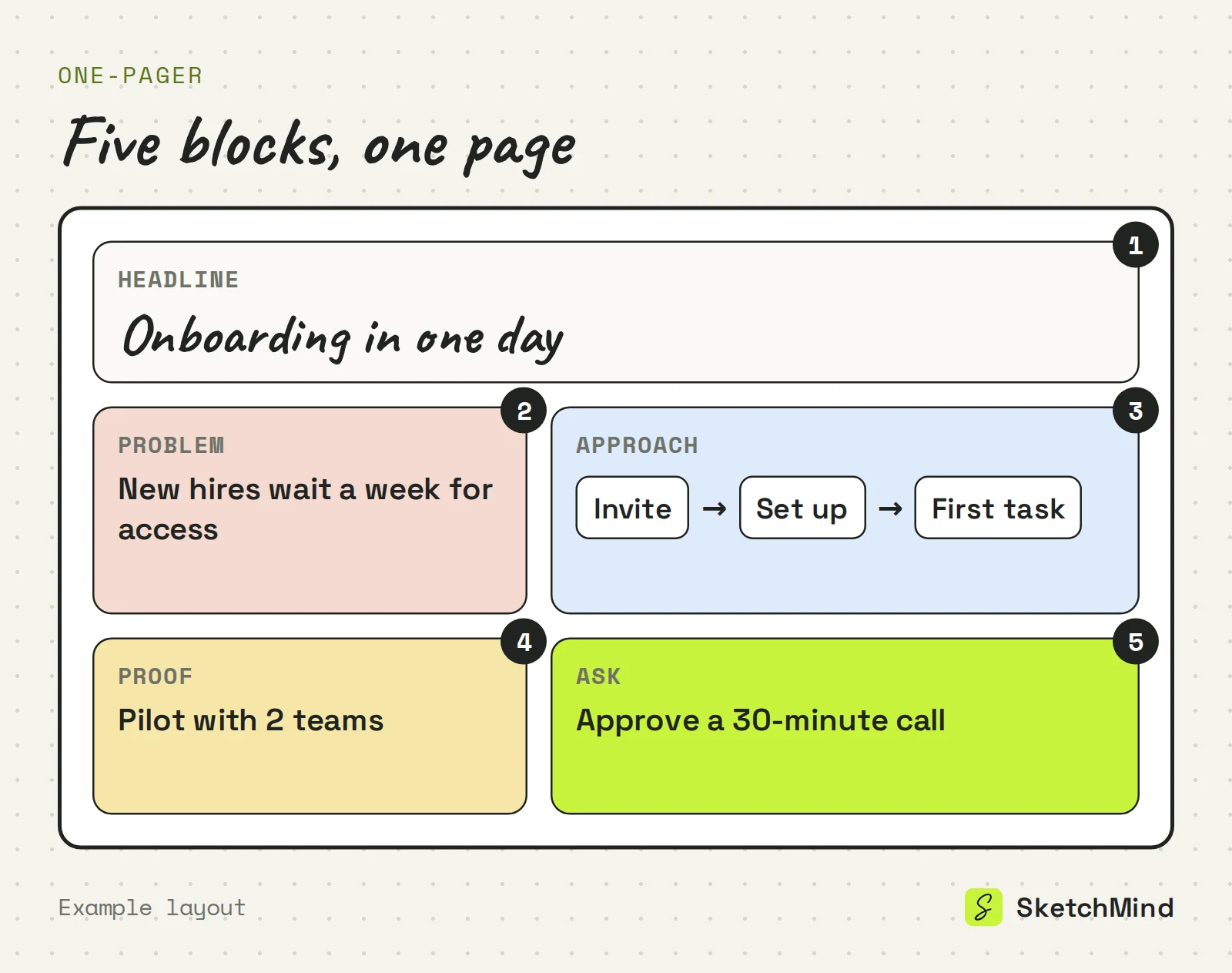
A one-pager should include five blocks: headline, problem, approach, proof and ask. Every block on the page should be doing one of these jobs.
The five blocks of a one-pager
|Block|Job it does|
|---|---|
|Headline|Names the thing and the point in one line|
|Problem|The situation the reader should recognize|
|Approach|What you do about it, the core of the page|
|Proof|Why anyone should believe it: results, examples, numbers you can defend|
|Ask|What happens next: the meeting, the trial, the decision|
Not every one-pager needs all five. But anything that isn't doing one of these jobs, like background, caveats or the second example, is page two trying to sneak in.
Why do most one-pagers grow past one page?
They grow because text editors invite completeness, and completeness is what the format exists to refuse. The draft gets one more paragraph of context, a second proof point, a footnote. Each addition is reasonable on its own. Together they turn the one-pager back into the document the reader was never going to read.
The deeper reason is that compression is thinking. Deciding what earns a place on the page means deciding what the point is, and including everything is a way to put that decision off. A page limit enforced by the format does what willpower doesn't.
How do you keep a one-pager on one page?
Make it visual instead of shorter. A wall of small text on one page is technically a one-pager, but the reader still has to work through it line by line. Lay the same content out spatially, with the approach as a row of steps, the proof as labeled blocks and the ask in its own corner, and the structure shows before a single word is read. Space is also a forcing function: on a fixed canvas the second example doesn't fit, and you can see that it doesn't.
- Write the headline first: the thing and the point in one line.
- Fill each of the five blocks with one or two lines.
- Cut anything that doesn't do one of the five jobs.
- Show the page to someone for 30 seconds and ask what the ask is. If they can't say, rewrite the ask block.
How to make a one-pager in SketchMind
SketchMind, an AI whiteboard, turns a description into a visual board you can edit. Open Create with AI on a board, or use the composer on Home, describe the one-pager in a sentence or two (the product, the audience, the ask) and pick an output:
- Flow gives one editable frame in about 20 seconds, the closest thing to a single page.
- Frames gives 4–8 editable frames in about 40 seconds, useful when you want to draft each block separately and keep the best parts.
You can attach one PDF of up to 5 MB as source material, for example the longer proposal the one-pager has to summarize. Every element on the board can be moved, restyled or deleted, and a selected AI frame has a Rewrite option where you type what should change. Your own additions stay.
To share it, send a link (viewers are unlimited on every plan), present it from the board one block at a time, or download it as a PNG from Share › Image. If the reader also needs the long version, Make a document writes A4 pages from the board's sections, and Download PDF opens your browser's print dialog. Documents are included in Pro (3 per month) and Pro Creator (unlimited), not in Free; from board to document covers that flow. The free plan includes 5 AI boards as a one-time allowance, with no credit card to start.
Last updated: September 25, 2026. Checked against the current SketchMind app.
What is a one-pager?
A one-pager is a single-page overview of one product, project, proposal or process. The reader sees the whole story at once, which makes it suited to quick decisions about whether to hear more.
What should a one-pager include?
A headline that names the point, the problem, your approach, proof it works, and a clear ask. If a block isn't doing one of those five jobs, it belongs in a longer document.
What is the difference between a one-pager and an executive summary?
An executive summary condenses a longer document and sits in front of it. A one-pager stands alone and works best as a visual layout the reader takes in at a glance.
Can I make a one-pager in SketchMind?
Yes. Open Create with AI, describe the product or project and choose Flow to get one editable frame in about 20 seconds. You can edit every element, present it from the board, or share it by link or as a PNG.
Can I export a SketchMind one-pager as a PDF?
A board can be downloaded as a PNG from Share › Image on every plan. PDFs come from Make a document, which writes A4 pages from the board; that is included in Pro (3 per month) and Pro Creator (unlimited), not in Free.