What belongs on a project checklist, why lists buried in documents go stale, a three-phase launch example, and a faster way to make one that stays in view.
Every project starts with a checklist, and most of them are dead by Friday. The items were usually fine. The list lived somewhere nobody looked after the kickoff. This piece covers what belongs on a project checklist, why lists buried in documents go stale, and a faster way to make one that stays in view.
Short answer: A project checklist is a short list of binary items, each either done or not done, that shows at a glance where a project stands. A good project checklist has 10 to 15 items split into phases (before, during, after), one owner per item that is really a decision, and no ongoing habits or whole workstreams. Keep it where the team already works, or it goes stale within a week.
A project checklist is a list of verifiable steps and decisions that must be true for a project to be finished. It differs from a backlog, which holds everything you might do, and from a project plan, which holds the goal, dates and owners. The checklist answers one question: what is done?
Project checklists go stale for structural reasons, not because people are lazy. Three are common:
A checklist earns its keep by being glanceable: one look tells you where the project stands. The moment it needs opening, scrolling or remembering, it starts to die.
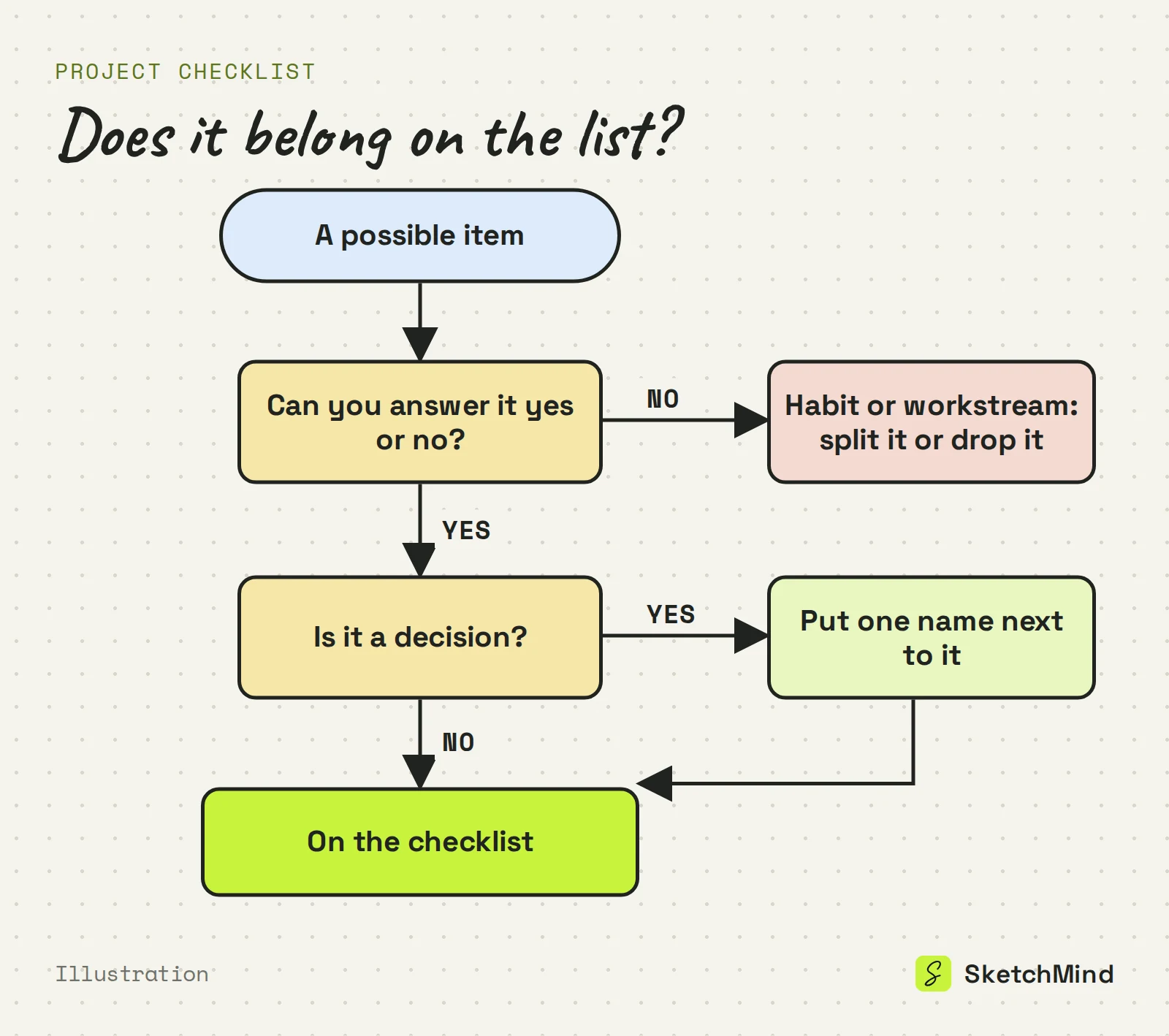
Only items you can answer with yes or no belong on a project checklist. No percentages, no "in progress". A quick sorting guide:
Does this item belong on the checklist?
|Item type|Example|Belongs on the checklist?|
|---|---|---|
|A verifiable step|"Staging environment tested"|Yes|
|A decision to make|"Payment provider chosen"|Yes, with a name next to it|
|An ongoing responsibility|"Monitor performance"|No, that is a habit|
|A whole workstream|"Build the website"|No, split it into steps|
Keep the list short enough to read without scrolling. If the project really has sixty steps, it has phases, and each phase gets its own short list.
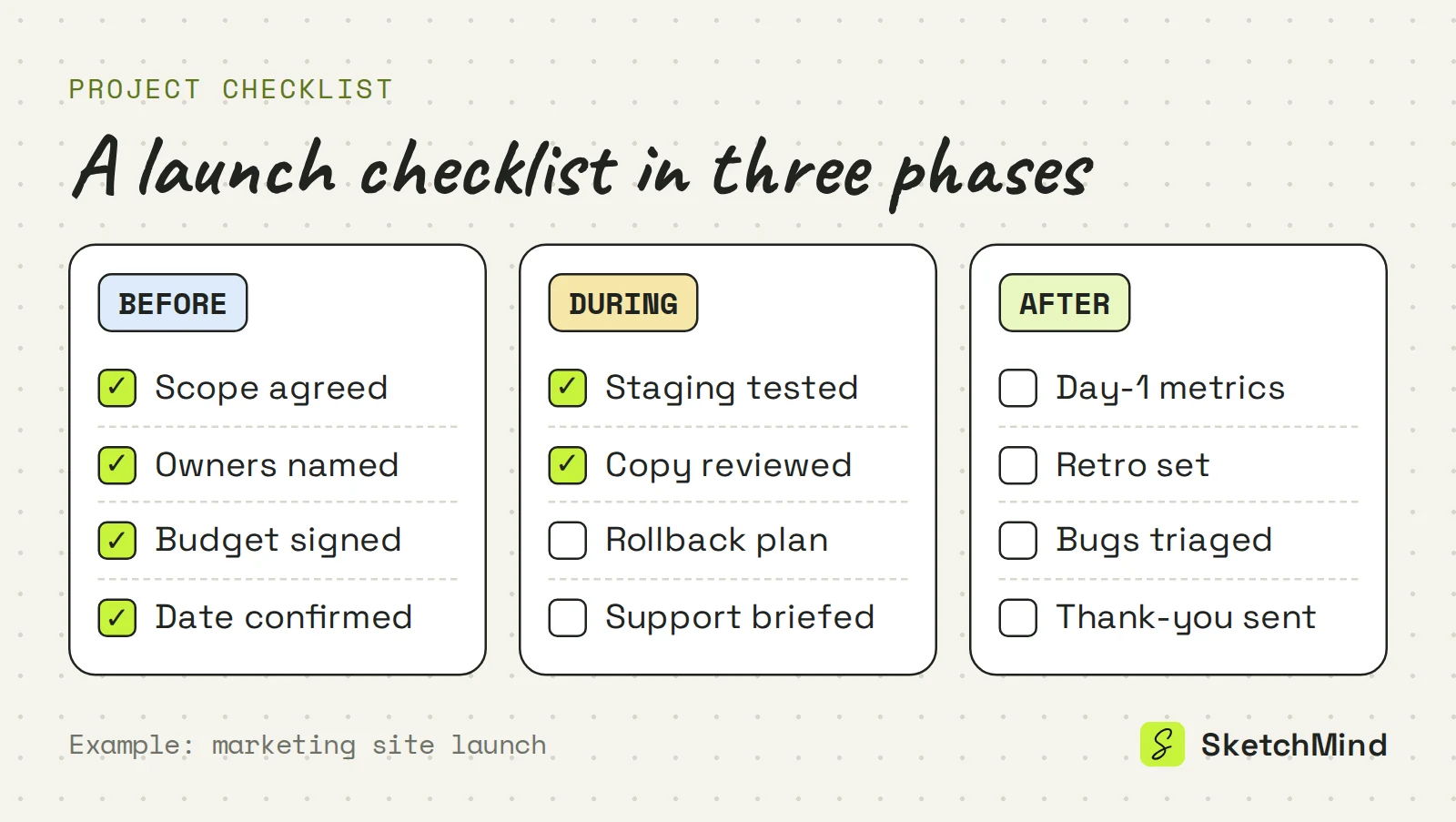
A typical launch checklist has 10 to 15 items across three phases. Every item can be answered with yes or no, which is what makes ticking them clear instead of ambiguous.
Put the checklist where the project's thinking already lives. If your plan, your flow and your open questions sit on a shared board, the checklist should sit next to them, visible in the same view and updated in front of the same people.
If the project has dates and dependencies, the checklist is not enough on its own. The guide to building a project timeline covers that part, and the action plan example shows how to turn goals into owned steps.
In SketchMind, an AI whiteboard, a checklist is one of the four outputs of Create with AI, next to Frames, Presentation and Flow.
From there every element is editable. If the list came out wrong, select the frame and use Rewrite with an instruction such as "split the launch phase into pre- and post-launch". For a short list you would rather type yourself, the toolbar also has a Checklist tool. Comments support @mentions, and boards are shared by link with unlimited viewers on every plan.
Items that outgrow a tick belong in the workspace tools, which are included on every plan: Agenda for tasks and the days they sit on, Goals for the outcomes those tasks serve, and a Focus timer of 15, 25 or 45 minutes. The Free plan includes 5 boards and 5 AI boards as a one-time allowance, with 2 editors per board. No credit card is needed to start.
Last updated: September 25, 2026. Checked against the current SketchMind app.
A project checklist is a short list of binary, verifiable items that shows at a glance where a project stands. It differs from a backlog, which holds everything you might do, and from a plan, which holds the goal, dates and owners.
About 10 to 15 items is enough for most projects. If a project has far more steps, split it into phases and give each phase its own short list.
A plan answers where you are going and who does what by when. A checklist answers what is done. In SketchMind, checklists come from Create with AI, while plans live in the separate Plans tool at /plans.
Open Create with AI, pick Checklist, describe the project and click "Create checklist". You get one editable checklist frame on your board in about 15 seconds, and you can also build one by hand with the Checklist tool in the toolbar.
Yes. The Free plan includes 5 boards and 5 AI boards as a one-time allowance, 2 editors per board and unlimited viewers, with no credit card needed to start.