
What a creative brief is, the seven sections that belong on the page, how to write one, and the vague lines that cost you a round of revisions.
Most disappointing first drafts trace back to the brief, not to the person who made the work. A creative brief is where you fix that, before anyone opens a design tool.
Short answer: A creative brief is a one-page document that tells the people making the work what it is for, who it must reach, what it has to say, and what the constraints are. A sharp creative brief is specific about audience and message and honest about budget and deadline, so the first round of work lands close to what you had in mind.
A creative brief is the written input for a piece of creative work: a campaign, a video, a landing page, a rebrand. It is written by whoever is asking for the work and read by whoever is making it, and its job is to transfer context, not to prescribe the execution. The brief says "convince busy founders that onboarding takes a day"; it does not say "use blue".
The test of a brief is simple: could someone who has never sat in your meetings make the right thing from this page alone? If the answer needs a follow-up call, the brief is not done.
Seven short sections cover most briefs. One page total; if it runs longer, the thinking is not finished.
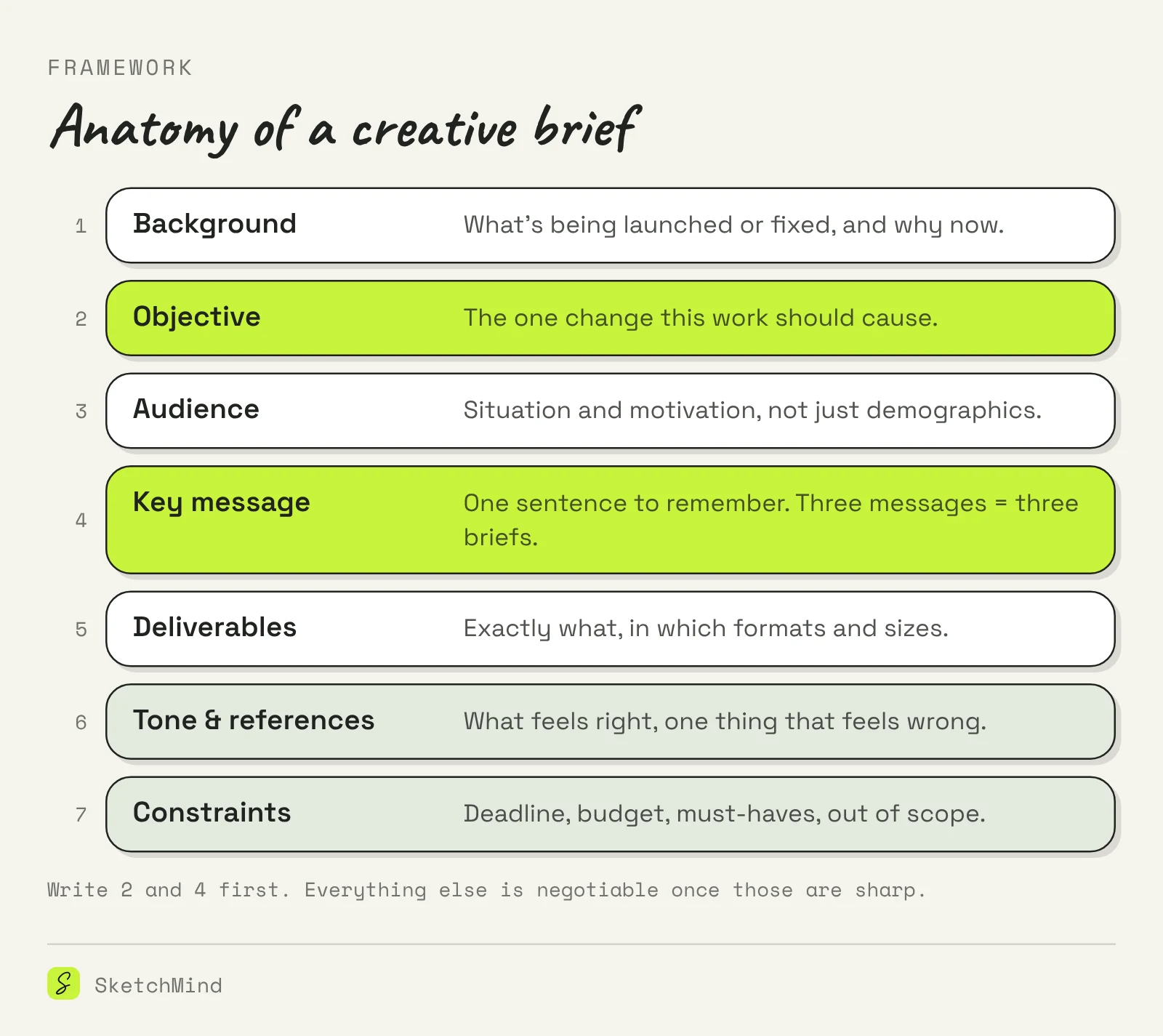
Write the objective and key message first, because everything else is negotiable once those two are sharp.
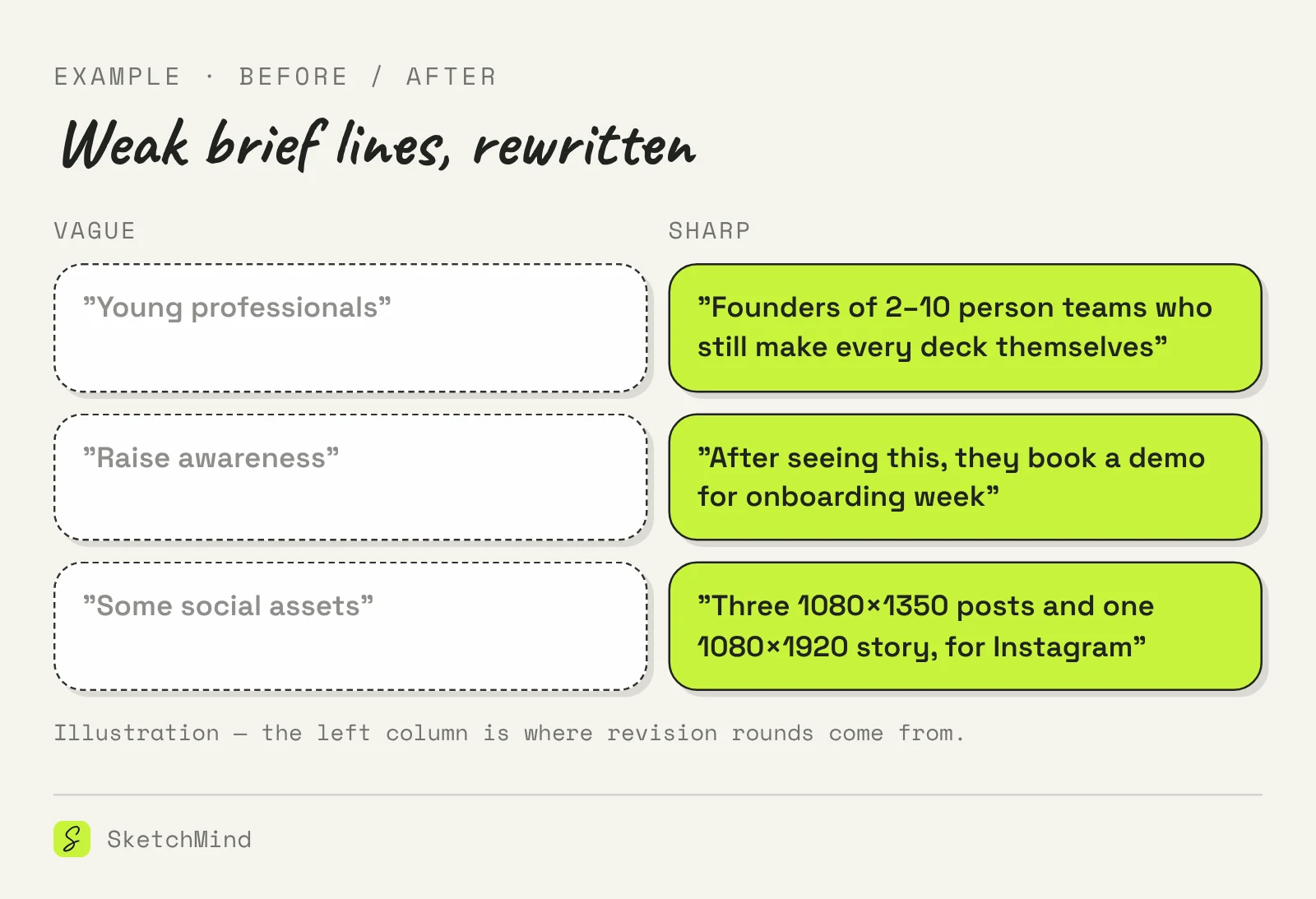
Weak briefs are vague where it costs the most: audience, message, and scope. The lines below are real types, not caricatures; most teams have written the left column at some point.
A creative brief argues for one piece of work; a project brief frames a whole project with phases and budget. A one-pager is the output side: the same discipline of one page, applied to presenting instead of commissioning.
Three one-page documents
|Document|Written for|Core question|
|---|---|---|
|Creative brief|The people making one piece of work|What should this work achieve, for whom?|
|Project brief|Everyone involved in a project|What are we doing, by when, with what?|
|One-pager|A reader deciding something|What should you know or decide?|
A brief becomes much easier to discuss once it exists as something visual. In SketchMind, an AI whiteboard, you can paste the brief into the Create with AI dialog, which takes a prompt of up to 3,000 characters, or attach it as a PDF of up to 5 MB; the result is written from it. Pick Frames and you get 4–8 editable frames on your board in about 40 seconds, one per section of the brief, which makes the kickoff review concrete: the team comments on frames instead of re-reading a document. For recurring content work, the same brief can feed a planning flow; teams that brief a month of posts at a time usually pair the brief with a content calendar. The Free plan includes 5 AI boards as a one-time allowance, and a board is shared by link with unlimited viewers on every plan, so the maker and the client can look at the same thing while they talk.
Last updated: October 19, 2026. Checked against the current SketchMind app.
One page. If it runs longer, the thinking is not finished; cut everything that does not change what the maker will do.
The person asking for the work. The maker should read it and ask questions before starting; a brief that survives those questions is ready.
The objective and the key message. If those two are sharp, a maker can fill reasonable gaps elsewhere; if they are vague, nothing else saves the brief.
A design brief is a creative brief for design work specifically. The sections are the same; deliverables and constraints just get more technical, such as grids, formats and accessibility requirements.
It can draft the structure and ask the right questions, but the objective, audience knowledge and the decision about what is out of scope come from you. AI is more useful for turning a finished brief into something visual to discuss.