What Create with AI does with the sentence you type: four outputs, what you can add as context, and how Rewrite and Continue refine the board.
Most whiteboard tools start you on an empty page. SketchMind starts you with a sentence: you describe what you're working on and land on a board that already has structure. This article explains what the Create with AI dialog does, what you can give it, and how to fix or extend what it makes.
Short answer: Create with AI turns a written description of up to 3,000 characters into an editable board. You choose one of four outputs (Frames, Presentation, Flow or Checklist), optionally add a PDF or your board's existing content as context, and get a first version in roughly 15 to 40 seconds. Afterwards you can Rewrite a single frame or Continue a section without starting over.
Create with AI is the dialog in SketchMind that builds a board from a description. On Home it is the composer under "Turn a thought into a visual board." Inside a board it opens from the Create with AI button. The dialog asks two things: what the result should become, and what it should be about.
What you get is a normal board. Every frame, shape and line of text is a real object you can move, restyle, rewrite or delete, exactly like something you placed yourself.
There are four outputs, and the choice decides what the AI builds from the same idea.
The four outputs of Create with AI
|Output|What you get|Typical time|
|Frames|4–8 editable frames|About 40 seconds|
|Presentation (Pro)|6–8 slides with speaker notes|About 40 seconds|
|Flow|One frame: steps and branches|About 20 seconds|
|Checklist|One frame of items to tick off|About 15 seconds|
Frames is the safest default when you're unsure. It gives your idea a sequence you can walk through, and you can restructure it afterwards. Pick Flow when the idea has an if-then in it, and Checklist when it is work you'll actually execute. Presentation is for when you already know you'll stand in front of people with it.
Plans are no longer a board type. If your idea has dates and owners, open Plans instead: it is a separate tool that starts from a board and drafts the steps for you.
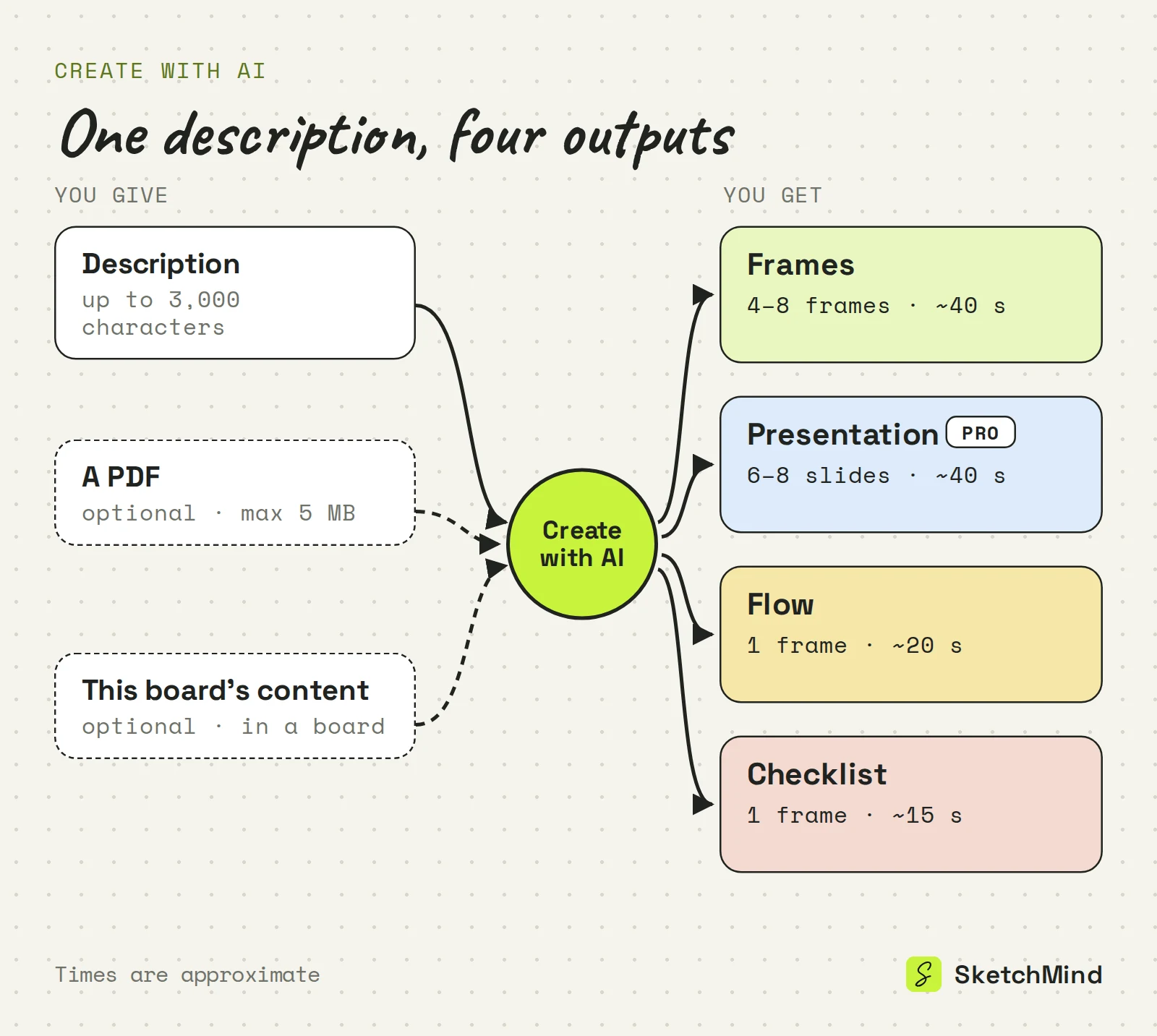
The main input is a description of up to 3,000 characters, and the output is written in the language of your prompt. On top of that you can add context:
If you don't know where to begin, the Examples link opens starting points for 20 roles, from entrepreneur to teacher to lawyer, three at a time.
Name the subject, the goal and the audience. "Help me with my startup" gives the AI very little. "Map the target customer, problem and riskiest assumptions for my plant-care subscription, for a first investor call" gives it a subject, a structure and a reader.
One or two specific sentences usually beat a paragraph of loose thoughts. If you have real source material, attach it as a PDF rather than pasting it in. For more examples, see how to prompt an AI whiteboard.
Frames appear on your board as they are made. If the direction is clearly wrong, you can stop midway; the frames already built are kept. Either way you end up on a regular board, not a locked preview.
Select an AI-made frame and use Rewrite. It opens "Rewrite this frame" with the question "What should change?" and suggestions like "Make it simpler", "Add a concrete example" and "More visual, fewer words". Only that frame's generated content changes. Your own additions stay, and the rest of the board is untouched.
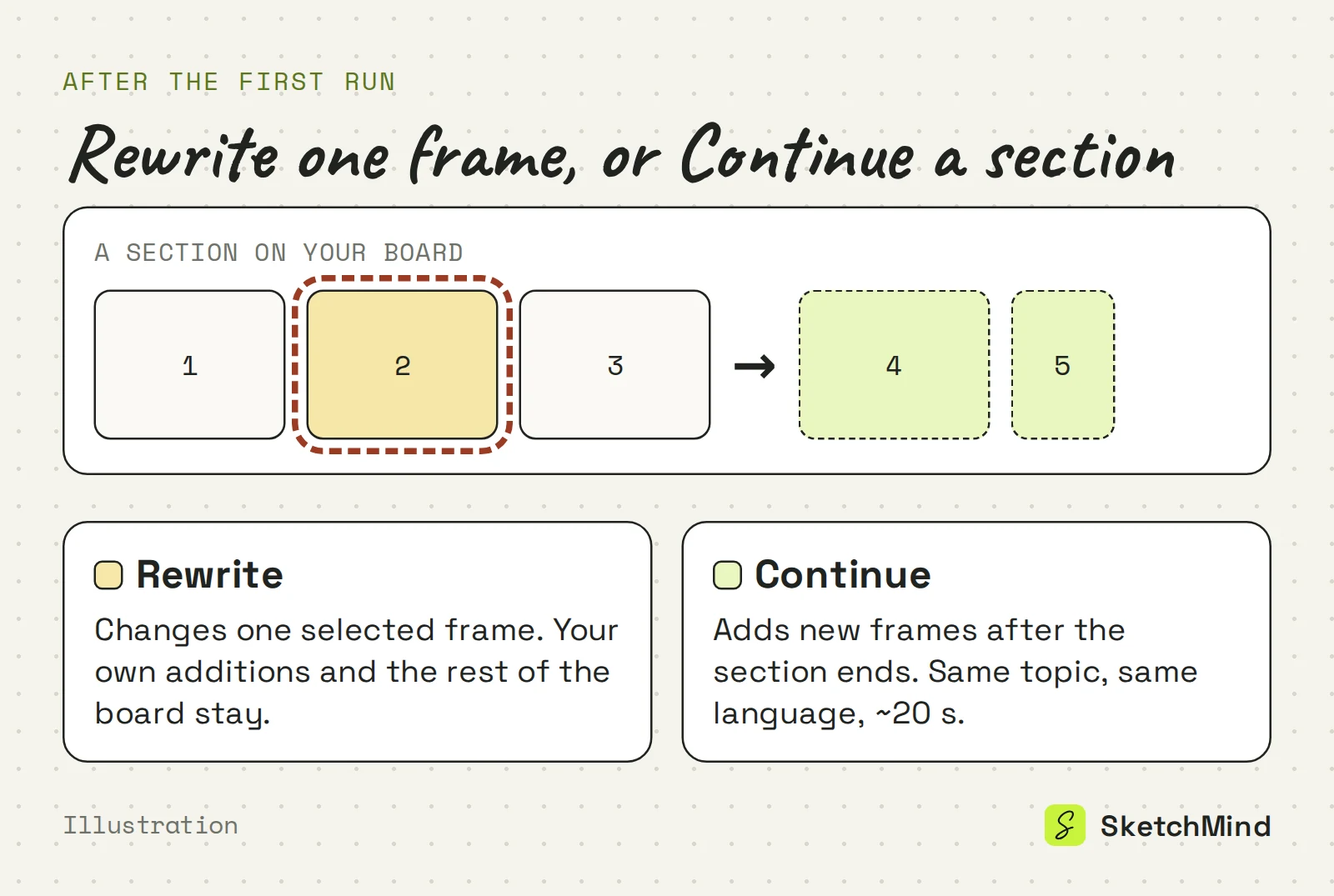
Continue picks up where an existing section of your board ends. In the dialog inside a board, open "Continue a section instead", choose the section under "Build on:", and the next part follows on with the same topic and the same language, without repeating what is already there. It takes about 20 seconds.
Use it when the first run covered the basics and you want the next layer: the objections after the pitch, the second half of a lesson, the edge cases after the main flow.
SketchMind, an AI whiteboard, is free to start without a credit card. The Free plan includes 5 AI boards and 5 rewrites, both one-time. Pro ($19 a month) includes 20 AI boards and 100 rewrites per month, plus 3 designed presentations per month. Pro Creator raises AI boards to unlimited within fair use (about 200 a month). Your usage meter still lists AI boards under their older name, AI Explainer.
Create with AI gives your thinking a place to start. It won't validate your business model, check your facts or make your decisions. What it removes is the first round of drawing boxes, so you can start reacting to something sooner. When the board is right, you can present it or turn it into a document; see from board to document.
Last updated: September 25, 2026. Checked against the current SketchMind app.
Create with AI is the dialog that builds a board from a written description. You pick an output (Frames, Presentation, Flow or Checklist), describe your idea in up to 3,000 characters, and get an editable board.
Yes. AI Explainer was the earlier name of the feature. The dialog is now called Create with AI, though the usage meter still lists it as AI Explainer.
Yes. Every frame, shape and text block is a normal board object you can move, restyle or delete. To have the AI redo one frame, select it and use Rewrite; your own additions stay.
You can attach one PDF of up to 5 MB, and the result is written from it. Inside a board you can also switch on "Use this board's content", and links in your description are read when the run starts.
Not as a Create with AI output anymore. Plans is a separate tool: you start from a board and SketchMind drafts the steps, which you can move to your Agenda or a Focus session.
The Free plan includes 5 AI boards and 5 frame rewrites, both one-time, with no credit card needed. Pro ($19 a month) includes 20 AI boards and 100 rewrites per month.