
How to prompt an AI whiteboard: pick the output, write goal, audience and points in order, add context, and fix one frame instead of the board.
An AI whiteboard turns a written description into a board: frames, a flow or a checklist you can edit and present. Most of the quality of that board is decided before you press the button, in the output you choose and the description you write.
Short answer: To prompt an AI whiteboard well, first choose the output that matches the shape you need, such as a set of frames, a slide deck, one flow or one checklist. Then describe the goal, the audience and the points to cover in the order you want them, and add context the AI cannot guess, like a PDF or a link. When one part misses, rewrite that part instead of generating the whole board again.
A whiteboard AI has to commit to a shape, so the output type matters as much as the words. A chatbot answers in text, and a loose question usually still gets a usable paragraph. A board needs frames, an order and a visual hierarchy. Ask for a sequence of frames when you wanted one overview diagram and you get a story where you wanted a picture. No rewording of the description fixes that. Choose the shape first, then write the words that fill it.
A good prompt names the goal, the audience and the points to cover, in order. You rarely need more than a few hundred characters if these three are clear:
Example: "Explain how onboarding works for new clients: kickoff, account setup, first project, two-week check-in. Friendly, no jargon." That is 17 words, and each clause is a decision the AI no longer has to guess.

Give it the context it cannot guess, and attach it rather than retyping it. Your company's situation is always in that category: no model knows that your launch moved to March or that "the portal" means your internal tool. If the material already exists as a brief, a report or meeting notes, attach the file and keep the prompt short and directive: what to build, for whom, in what order. If you already sketched part of the thinking on the board, let the AI build on it instead of starting blank.
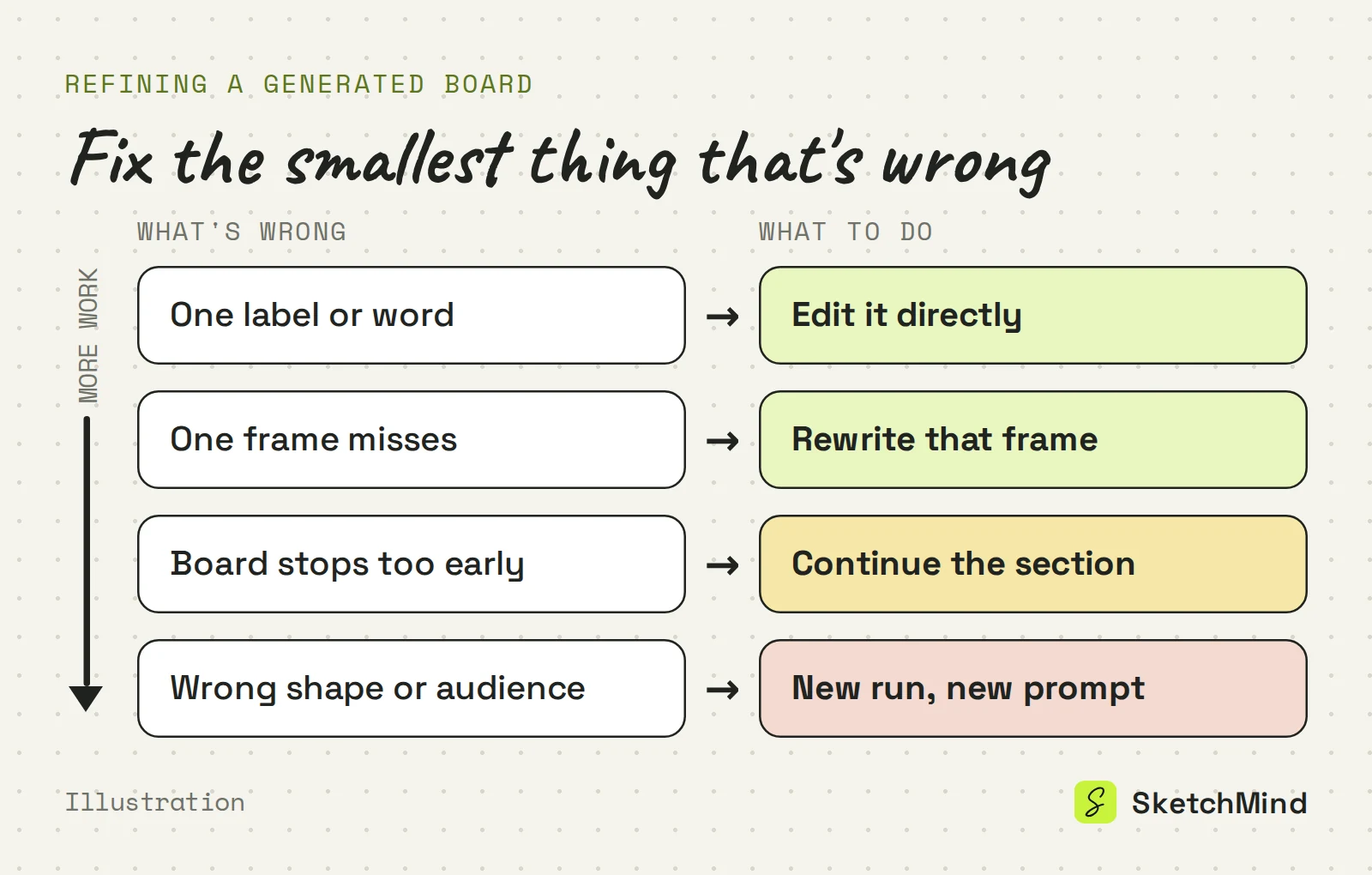
Fix the smallest thing that is wrong, not the whole board. A wrong word is a direct edit. A frame that misses gets a targeted rewrite with one instruction. A board that stops too early gets extended. Start a new run only when the structure itself is wrong: wrong output, wrong angle or wrong audience. Regenerating everything to fix one frame throws away the frames that were already good.
In SketchMind, an AI whiteboard, you prompt through Create with AI: on Home it is the composer under "Turn a thought into a visual board", and inside a board it is the Create with AI button. You pick one of four outputs and write a description of up to 3,000 characters.
The four outputs in Create with AI
|Output|What you get|Typical wait|Good for|
|Frames|4–8 editable frames on your board|About 40 seconds|Explanations, lessons, walkthroughs|
|Presentation (Pro)|6–8 designed slides with speaker notes|About 40 seconds|Talks and pitches presented as a deck|
|Flow|One editable flow frame|About 20 seconds|Processes and decision paths|
|Checklist|One editable checklist frame|About 15 seconds|Prep lists and routines|
Planning with dates and owners is not one of the outputs. That is Plans, a separate tool that starts from a board and drafts the steps for you.
The context options sit next to the description:
The board comes back in the language you write in. To refine it, select a frame and choose Rewrite. It asks "What should change?" and offers "Make it simpler", "Add a concrete example" and "More visual, fewer words"; your own additions to that frame stay. To extend a board, open Create with AI inside it and choose Continue a section instead: the next part picks up where the section ends, with the same topic and language.
AI runs are counted, so a minute spent on the prompt is worth it. The Free plan includes 5 AI boards and 5 AI rewrites, one time. Pro ($19/month) includes 20 AI boards and 100 rewrites per month, and Pro Creator ($49/month) is unlimited within fair use. Editing a board by hand, presenting it and sharing it do not use AI credits. For ready-made prompts, see our AI prompt examples, and for what happens after you press the button, how the AI turns one sentence into a board.
Last updated: September 25, 2026. Checked against the current SketchMind app.
The description in Create with AI takes up to 3,000 characters. If the source material is longer, attach it as a PDF of up to 5 MB and keep the description short.
Yes. A URL in the description is read when the run starts, and you can attach one PDF as context. Inside a board, the "Use this board's content" toggle lets the AI build on what is already there.
Yes. Select the frame, choose Rewrite and say what should change, or pick a suggestion such as "Make it simpler". The rest of the board stays as it is, and your own additions to that frame are kept.
Not as a Create with AI output. Plans is a separate tool in SketchMind that starts from a board and drafts the steps for you.
The language of your prompt. A description written in Dutch or Spanish gives a board in Dutch or Spanish.
Yes. The Free plan includes 5 AI boards and 5 AI rewrites as a one-time allowance, and no credit card is needed to start.