
What goes in a sprint planning template: goal, capacity, owners, definition of done and risks. And why the capacity math comes first.
Sprint planning is where a backlog turns into a commitment. A template keeps that meeting from producing a vague list that nobody checked against the hours the team actually has.
Short answer: A sprint planning template is a fixed structure you fill in during sprint planning: the sprint goal, the team's real capacity, the selected items with an owner and an estimate each, the definition of done, and the risks you are accepting. Fill in capacity before you pick work. That one habit turns the sprint plan from a wish list into something the team can finish.
A sprint planning template is the same five questions asked at the start of every sprint, in the same order. The value is not the formatting; it is that the questions get asked at all. Teams skip capacity because it is awkward, skip owners because assigning feels bureaucratic, and skip risks because naming them feels negative. Two weeks later the sprint is late for exactly those reasons.
Five fields cover what a sprint needs to be real. If your template has fifteen, the ten extra are the reason nobody fills it in.
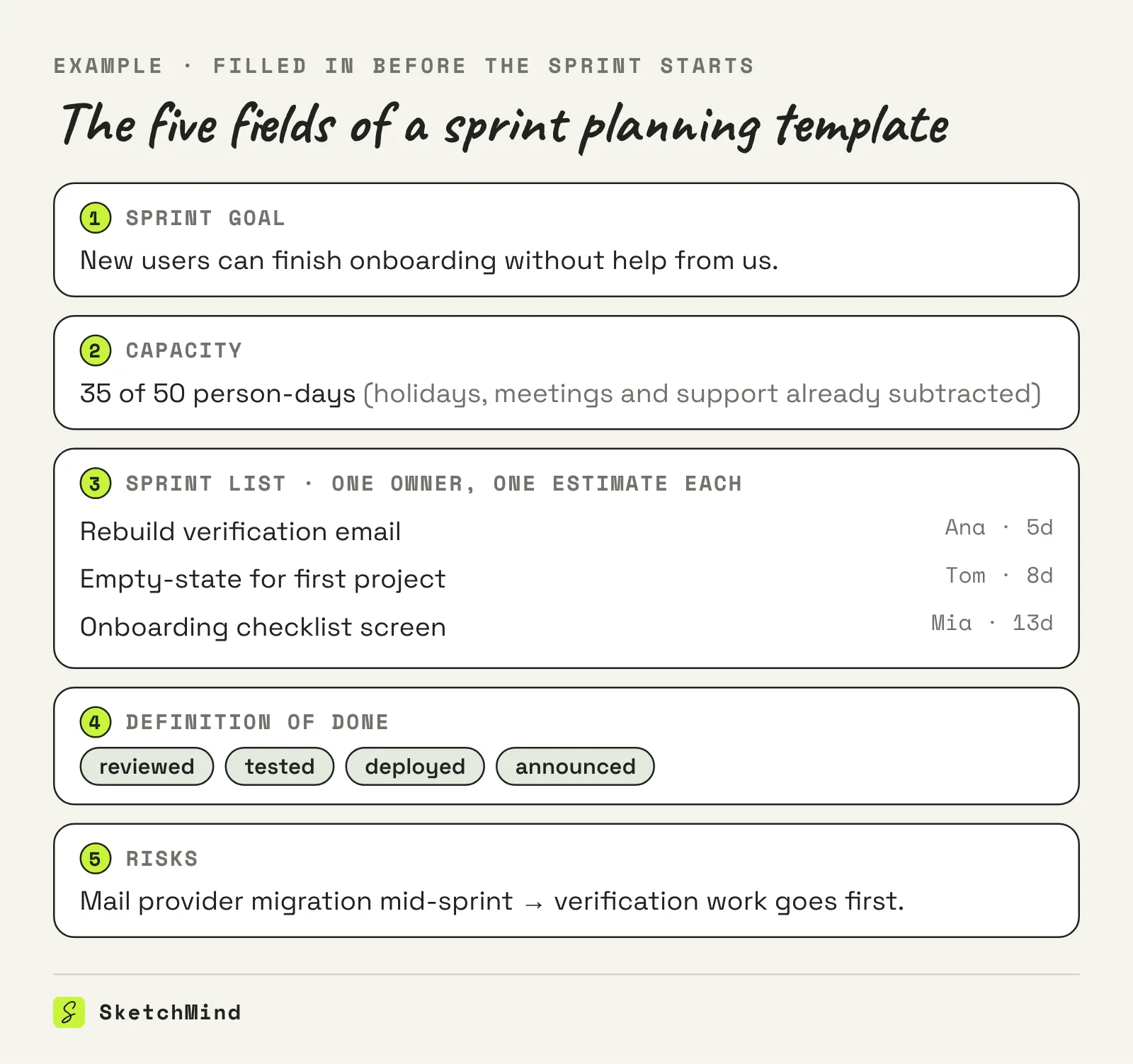
The template splits the meeting into before, during and after, and the before part is where the time is won.
Sprint plans go stale because they live in a document and the sprint happens somewhere else. The plan was true on Monday morning; by Wednesday two items grew, one person went home sick, and the document still shows the Monday version. Nobody updates it because updating it changes nothing: the document does not know about the team's days or deadlines.
The fix is structural: keep the plan where the dates and owners live, so a change in the plan changes someone's week. A plan whose steps sit on real calendar days, with a real person on each step, gets corrected as a side effect of people doing the work.
Three artifacts, three horizons
|Artifact|Horizon|What it answers|
|---|---|---|
|Sprint plan|One sprint|What do we finish, who does what, how much fits|
|Sprint backlog|One sprint, live|What is left right now, in what order|
|Roadmap|Quarters|Where is the product going, roughly when|
The sprint plan is the snapshot the team commits to; the backlog is the living list that drains during the sprint; the roadmap is the long line the sprints add up to. A good action plan shares the sprint plan's anatomy, and for anything longer than a few sprints you are really building a project timeline.
Yes, if you describe the sprint instead of hunting for a template. In SketchMind, an AI whiteboard, Plans has no ready-made sprint template on purpose: you press "+ New plan", pick the shape (Phases, Weeks, or Milestones), and describe the sprint in the "Describe it · AI drafts the plan" field: what you are building, for whom, by when, with whom. You can paste a brief or attach a PDF of up to 25 MB. The AI asks only for what is missing (scope, people, timing, constraints, what success means) and then drafts the plan: steps with dates and owners, a short rationale per step, and risks with what to do about them. Every step lands on its owner's agenda, and when reality drifts the plan says so: "Running 3 days late" comes with "Move the plan 3 days" or "I'll catch up", so the plan shifts instead of silently rotting. The capacity call and the final scope stay yours; the drafting and the date-shuffling stop costing an afternoon.
Last updated: October 8, 2026. Checked against the current SketchMind app.
The sprint plan is the snapshot the team commits to at planning: goal, capacity, items with owners. The sprint backlog is the live list that changes during the sprint as work gets done and reality interferes.
A common rule of thumb is about an hour per week of sprint, so two hours for a two-week sprint. If it takes much longer, the preparation was missing, not the time.
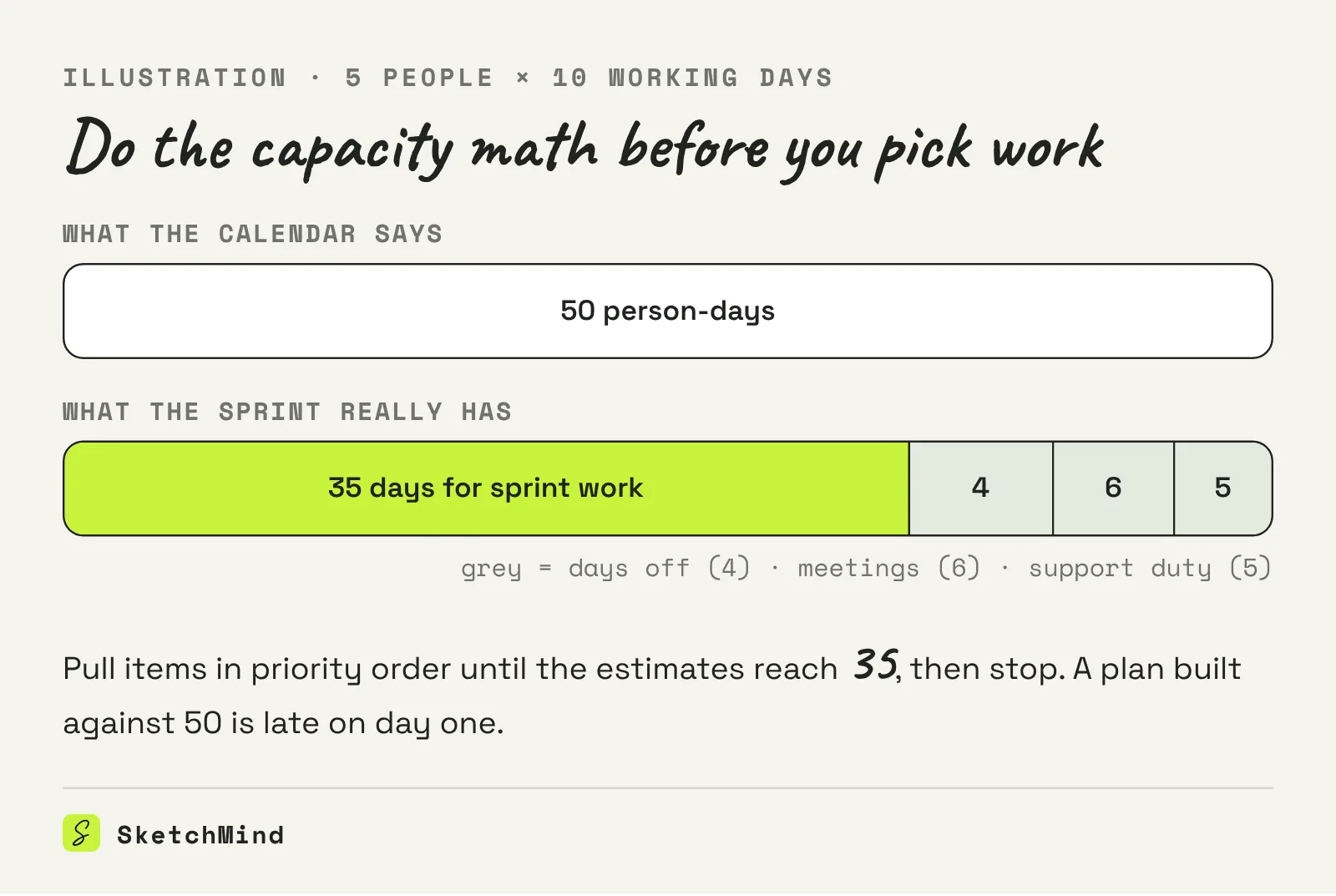
Multiply people by working days, then subtract everything the calendar already claims: holidays, interviews, support duty, recurring meetings. The leftover is what you plan against.
One sentence that describes a state, not a list of tickets: "New users can finish onboarding without help." You can test every candidate item against it.
No, and that is deliberate. In Plans you describe your sprint and the AI drafts it as phases or weeks with steps, dates and owners; the AI asks for whatever is missing instead of handing you empty boxes.