What a process map is, the four elements that belong on one, how it differs from a flowchart, and a faster way to make one and keep it true.
Ask three people how the monthly report gets made and you'll get three different answers, plus one step nobody claims. That gap is what a process map is for. It's also why "we should map this out" is said far more often than it's done.
Short answer: A process map is a diagram of how a piece of work moves from start to finish: the steps in order, the decisions where the path splits, and the handoffs where the work changes hands. It gives a team one shared picture of how the work really runs, so gaps, delays and unclear ownership become visible and fixable.
A process map is a picture of one process, drawn so that everyone involved can point at it and agree "this is how it works". There are formal schools of process mapping with strict notations, such as BPMN, but for most teams the plain version is the useful one. If the whole team recognizes the picture, the map has done its job.
The value isn't the drawing. It's that the drawing forces the invisible parts into the open: the step that lives in one person's head, the decision that gets made differently depending on who's on duty, the handoff where things quietly wait for three days.
Four elements: a start and an end, the steps, the decisions and the handoffs. Anything beyond that usually makes the map harder to read.
The four elements of a process map
|Element|What it answers|Usually drawn as|
|Start and end|What kicks the process off, and what "done" means|Rounded shape|
|Steps|What happens, in what order|Rectangle|
|Decisions|Where the path splits, and on which question|Diamond with yes/no exits|
|Handoffs|Where the work changes hands|Arrow crossing into another lane|
What doesn't belong: edge cases from 2019, tool names, org-chart politics. A good process map answers "how does this actually work" at a glance. If it needs a legend and a guided tour, it has become documentation wearing a diagram costume.
Lanes help with handoffs. Give each role its own column or row (a "swimlane"), and every arrow that crosses a lane is a handoff: the place where work most often waits.
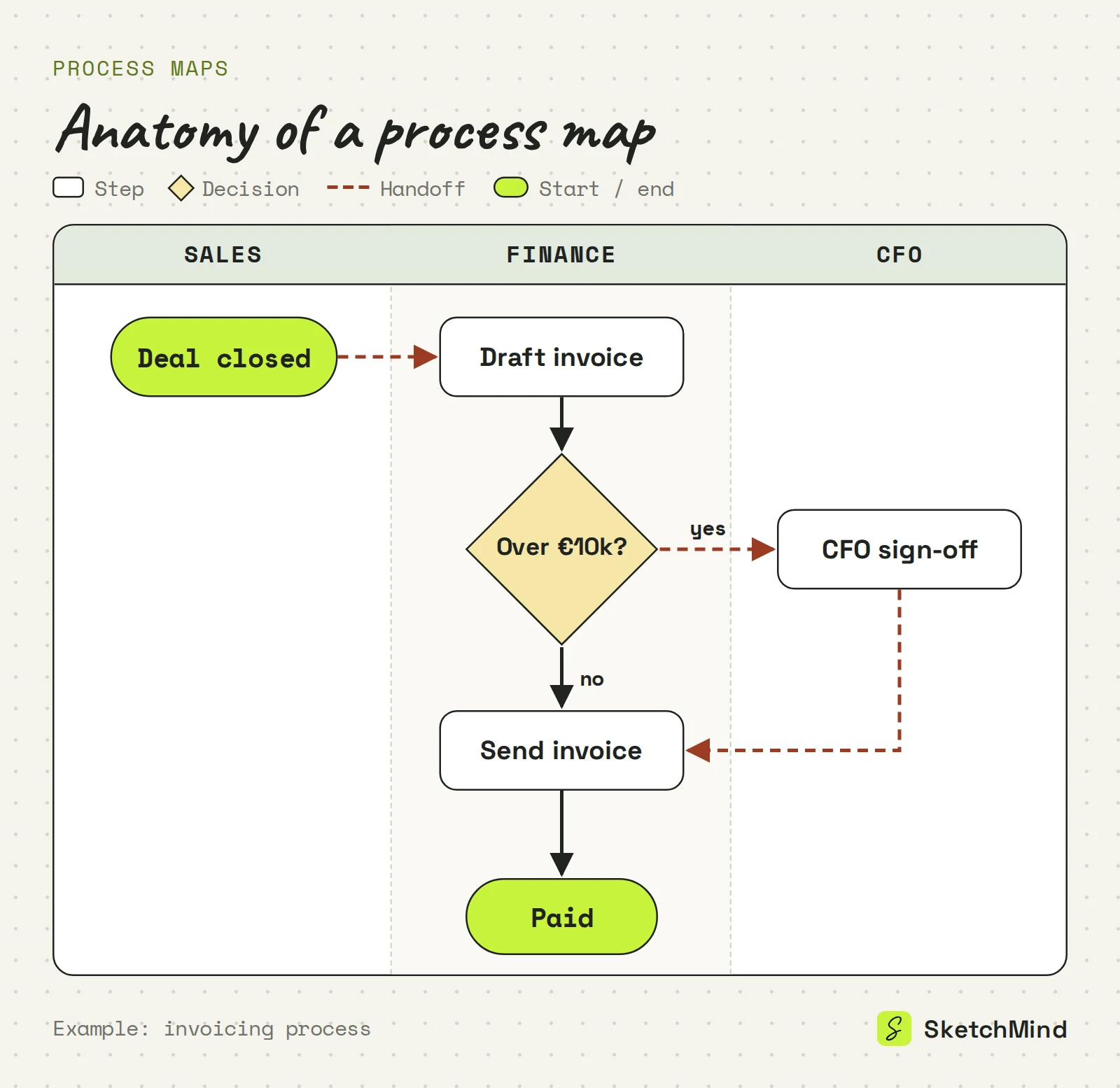
A flowchart is the notation; a process map is that notation applied to one real process, usually with the roles and handoffs shown. Every process map is a kind of flowchart, but not every flowchart maps a process. A flowchart can also show an algorithm or a single decision. If your goal is to choose between options rather than describe how work moves, a decision tree is the better format.
Usually for three reasons, and all three are drawing problems, not thinking problems.
The fix isn't more discipline. It is taking the drawing off the critical path.
Describe the process in plain language and let the tool draw the first version. In SketchMind, an AI whiteboard, you open Create with AI, pick Flow and write the process out, up to 3,000 characters:
"Map our invoicing process: sales closes the deal, finance drafts the invoice, a decision on whether it's above €10k (above goes to the CFO for sign-off), then it's sent, and we chase payment after 30 days."
One editable flow frame lands on your board in about 20 seconds. If the process is already written down, attach one PDF (up to 5 MB) as context. Inside an existing board, "Use this board's content" lets the map build on notes and frames you already have. For the details of writing a good description, see how to create a flowchart by describing it.
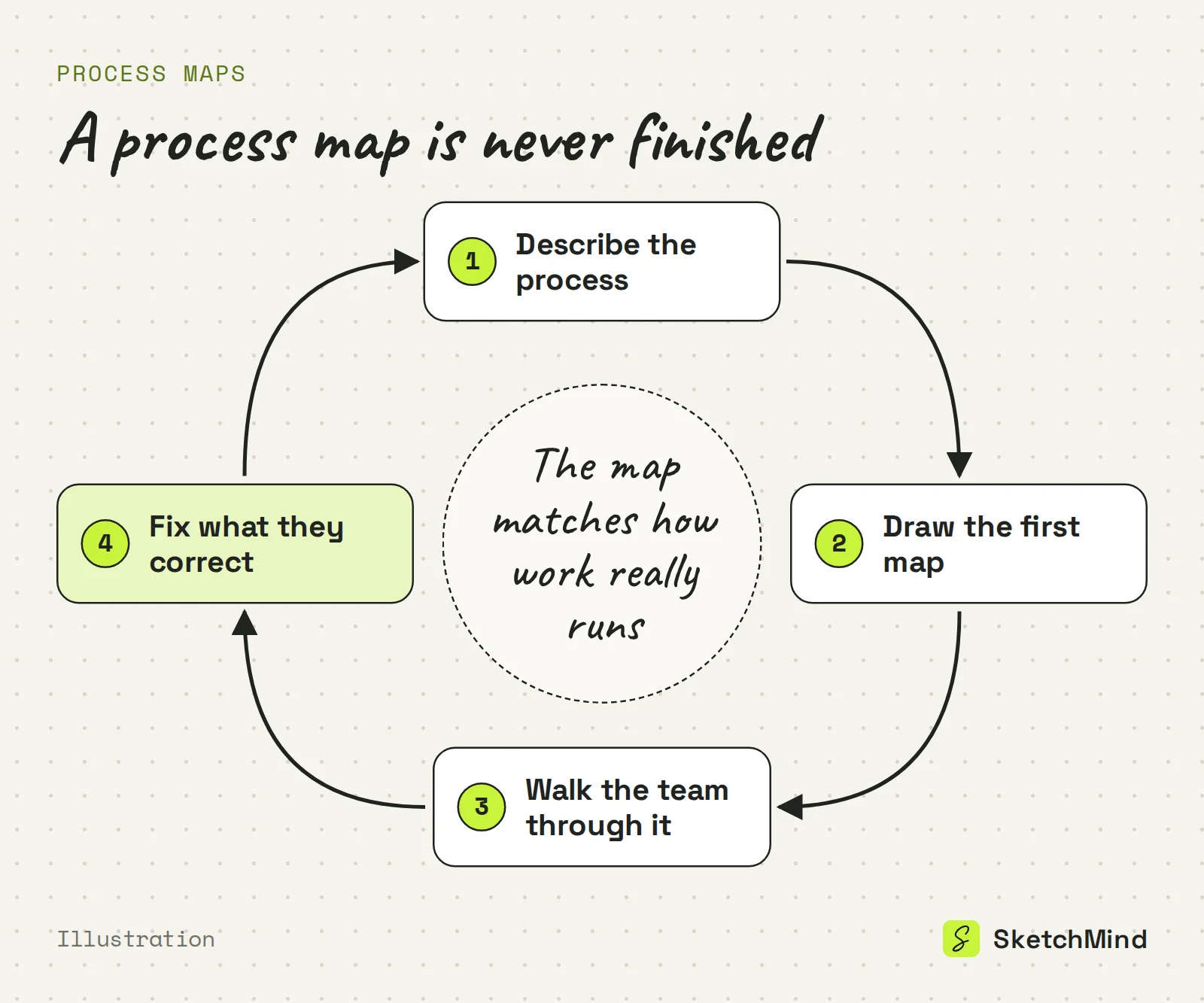
The result is a starting point, not a verdict. Every box and arrow is editable. When someone says "that's not how invoicing actually works" (someone always does), fix it on the spot, or select the frame, tap Rewrite and say what should change.
Show it to the people who do the work, and treat their corrections as the point of the exercise. A map that lives in a folder changes nothing.
Viewers are unlimited on every plan. Generating a map uses one AI board: the Free plan includes 5 AI boards as a one-time allowance, with no credit card to start, and Pro ($19/month) includes 20 AI boards per month. See the pricing page for the full list.
Last updated: September 25, 2026. Checked against the current SketchMind app.
A process map is a diagram of how a piece of work moves from start to finish: the steps in order, the decisions where the path splits, and the handoffs where the work changes hands.
A flowchart is the notation of boxes, diamonds and arrows. A process map applies that notation to one real process, usually showing who does each step and where work changes hands.
Detailed enough that someone new could follow the path, light enough to read at a glance. Start and end, steps, decisions and handoffs are usually all it needs.
Yes. Pick Flow in Create with AI and describe the process in up to 3,000 characters; one editable flow frame appears on your board in about 20 seconds.
No. Viewers are unlimited on every SketchMind plan, including Free.